Block landing · ornamental grass cad block
Ornamental grass CAD block in DWG
By Saumyajit Maity · Published 22 Jun 2022 · Updated 14 Mar 2026
Ornamental grasses give a landscape its softness and movement: the fine, upright blades arch and feather in a way that no rigid shrub or tree can, which is why planting designers use them to add texture, screening and a sense of motion to a scheme. This free ornamental grass CAD block captures a clump of decorative grasses in DWG for AutoCAD 2004 or later. It is free for personal and commercial work, with no signup, no watermark and no attribution.
Grasses are the planting layer that makes a contemporary landscape feel alive. Whether massed along a path, used to screen a low wall, or set as a feature clump in gravel, they bring a light, naturalistic quality that has become central to modern planting. This block reads clearly as ornamental grass — fine arching blades rising from a tight base — so it slots into elevations and sections wherever a scheme needs that feathered, moving texture.
What the ornamental grass block shows
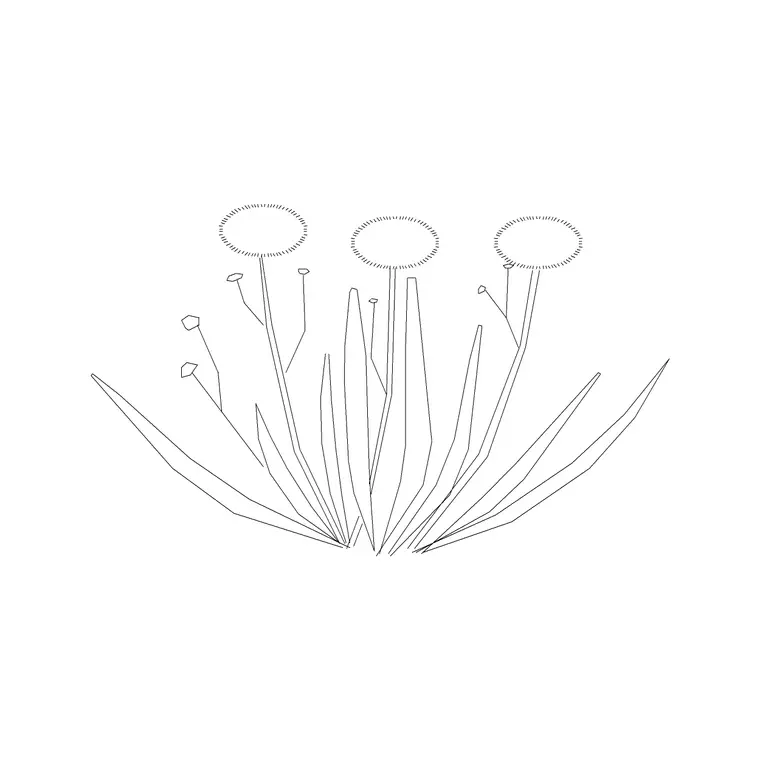
The block draws a clump of fine, arching blades springing from a tight base and fanning outward and upward, the unmistakable silhouette of an ornamental grass like miscanthus, pampas or feather grass. The blades are drawn as flowing, varied lines so the clump reads as something soft and moving rather than a stiff fan, with some blades arching over at the tips for that characteristic feathered look.
There is no pot — the grass springs from the ground line as ground-planted landscaping. The fine linework is built to be screened back so the grass softens the drawing rather than competing with harder elements, and the clump sits as a single block reference so you can place and array it along a bed.
Views and what's included
This is an elevation block: the grass clump seen face-on, sitting on the ground line, for landscape elevations, street sections, garden drawings and planting presentations. Elevation is the view where a grass's height and arching habit read together.
The fine blades are kept on linework you can screen back or recolour to a soft green or straw tone, and the block inserts as a single reference so you can mass a drift of grasses from one clump. Explode it only if you want to vary an individual clump's outline for a more natural, less repetitive planting run.
Typical sizing to design around
Ornamental grasses range from low edging tufts to tall feature clumps. As a planning range, the version drawn here suits a medium-to-tall clump — the kind that rises to around waist-to-head height and arches over at the top — with the base kept tight and the blades spreading above. Use the ground line as your datum and judge the clump height against people, walls and neighbouring planting in the elevation.
These are ranges to design within, not fixed numbers on the block. Grass species span low festuca to towering pampas, so scale the block to the planting palette — keep it low for an edging drift or tall for a screening feature. As a single block reference, it stretches in height and width without you redrawing the blades.
How to insert and mass it
The DWG is drawn in millimetres. Insert at scale 1 in a millimetre drawing, 0.001 in a metre template, or set INSUNITS to millimetres in an imperial file so AutoCAD rescales the block automatically and the grass lands at the right height against your section.
Use INSERT or drag the file in, pick the base of the clump as the insertion point, and snap it to the ground line so the grass sits on the ground rather than floating. Grasses look best massed, so copy or ARRAY the clump into a drift — but vary the scale, mirror some, and let the heights ripple so the planting reads as a natural sweep rather than a hedge of clones. Keep it on a landscape planting layer (L-PLANT) so you can freeze it for a structural elevation and thaw it for the planted view.
Where ornamental grasses are used
Ornamental grass blocks belong in landscape and architectural drawings: contemporary and naturalistic garden elevations, public-realm and streetscape sections, rooftop and courtyard planting, gravel and prairie-style schemes, and the soft-screening planting along low walls and boundaries. They give a planting scheme its movement and fine texture.
They are most effective massed in drifts and layered with shrubs and perennials, the signature of modern naturalistic planting. Combine the grass with shrub, perennial and tree blocks from the trees-and-plants and outdoor libraries, and array a rippling drift at varied heights to build a convincing contemporary planted scene in an elevation or section.
Making a grass drift read as movement, not a hedge
The whole appeal of ornamental grass is softness and motion, so a row of identical clumps defeats the point. When you mass grasses, vary the height and width between clumps, mirror some, and let the tips arch in slightly different directions so the drift looks windblown rather than clipped. Screening the fine blades back a little also helps them read as airy.
Mixing the grass with shrubs and perennials, rather than planting it in a solid block, gives the naturalistic layered look that suits this kind of planting. Leave the block named for easy edits, and WBLOCK a rippling drift you like into your office library so a ready-made, naturalistic sweep of ornamental grass is one insertion away on the next landscape elevation.
Free download
Browse the full library — DWG & DXF, no signup.
Questions
Frequently asked
What does an ornamental grass block add to a landscape drawing?+
Softness, fine texture and a sense of movement. The arching blades give a scheme the airy, naturalistic quality central to modern planting, which rigid shrubs and trees cannot provide. It is used massed in drifts and layered with shrubs and perennials.
Is the ornamental grass CAD block free for commercial use?+
Yes. It downloads free in DWG with no signup, no watermark and no attribution, and it is cleared for commercial landscape and architectural drawings as well as personal and student work.
How do I mass grasses without them looking like a hedge?+
Vary the height and width between clumps, mirror some, and let the tips arch in different directions when you copy or array them into a drift. Mixing the grass with shrubs and perennials rather than planting a solid block gives the naturalistic, windblown look that suits ornamental grasses.
What view is the block drawn in?+
Elevation — the grass clump seen face-on, sitting on the ground line, for landscape elevations, street sections and planting presentations. It is ground-planted with no pot, not a top-down plan symbol.
Related downloads
Blocks for this guide
Related categories
Related guides
Block landing
Free Flower Plant CAD Blocks — DWG Download
Free flower plant CAD blocks in DWG and DXF — flowering annuals and perennials in plan and elevation for AutoCAD landscape plans. No signup, commercial OK.
Block landing
Free Flowering Shrub CAD Blocks — DWG Download
Free flowering shrub CAD blocks in DWG and DXF — ornamental shrubs in plan and elevation for AutoCAD planting and site plans. No signup, commercial OK.
Block landing
Free Herb Plant CAD Blocks — DWG Download
Free herb plant CAD blocks in DWG and DXF — herbs for kitchen gardens, raised beds and planters, in plan and elevation for AutoCAD. No signup, commercial OK.