Block landing · mini truck cad block dwg
Free mini truck CAD block in DWG and DXF
By Sumana Kumar · Published 15 Mar 2026 · Updated 13 May 2026
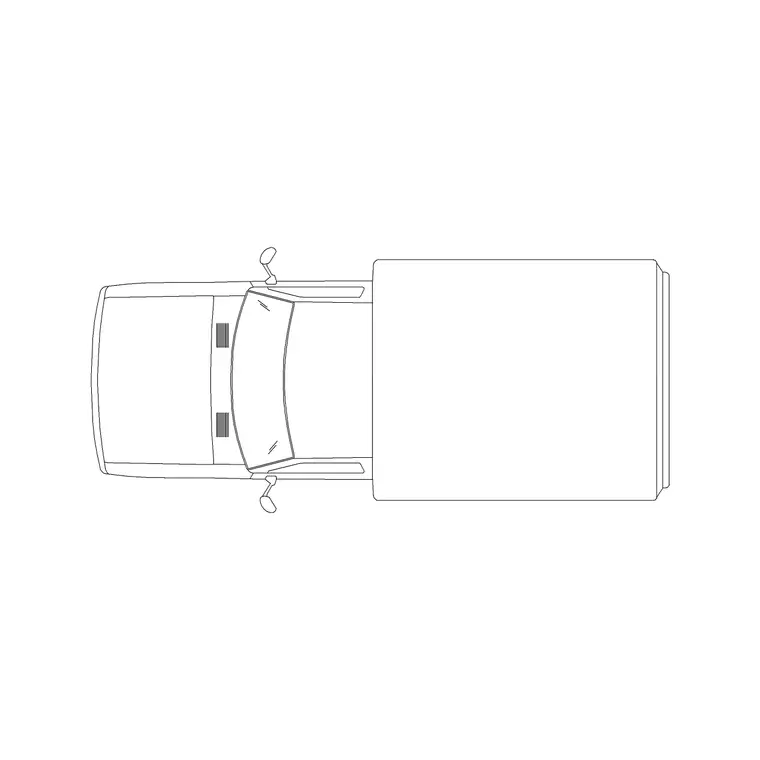
A mini truck CAD block is a small commercial vehicle — a light pickup or compact box truck — shown as a plan footprint for loading bays, service yards and delivery-access studies. It is the block to use when a layout needs to prove that a small goods vehicle can reach, park and turn, without the bulk of an articulated lorry. This page offers a free mini truck block in DWG and DXF, drawn to true scale for AutoCAD 2004 or later, free for personal and commercial use with no signup or watermark.
Use the footprint to lay out loading bays, check service-yard manoeuvring, size delivery parking and confirm access through gates and around buildings. Drawn to scale, it slots onto a site plan so reach and clearance become a glance rather than a calculation.
What the mini truck block is
This block is the top-down outline of a small commercial vehicle — the body footprint, the wheels and usually the cab-to-body break, seen from above. It is clean line geometry, so it prints sharply and stays light however many you place across a yard or loading area.
The mini truck sits between a large car and a full goods vehicle: bigger than an SUV but far smaller than a rigid lorry. That makes it the right block for the many real deliveries that arrive by light van or small flatbed, where designing for a 12 m lorry would be wildly over-scaled and designing for a car would be wrong.
View and what's included
The download is a plan (top) view — the mini truck seen from above — the view for loading-bay layouts, service-yard plans, delivery-access studies and site circulation diagrams. It arrays cleanly along a bay line and sits naturally beside the building footprint and other plan-view vehicles.
The geometry is layered so you can put the trucks on a dedicated vehicle layer, recolour them, and freeze them to reveal the bare yard layout beneath. Keep each one as a single block reference so it copies, rotates and arrays as one object when you populate a loading area or a delivery strip.
Typical sizing to design around
Use the footprint as a scale check against your yard and bays. A mini truck or light commercial vehicle generally sits in the region of 4.5–6.0 m long and about 1.8–2.1 m wide, depending on whether it is a pickup, a panel van or a small box body — bigger than an SUV but well short of a rigid truck.
Those ranges let you size a loading bay, a turning head and a gate width for realistic small-goods access. A scaled footprint shows immediately whether the vehicle clears a gate or swings round a yard. Real light commercials vary widely, so scale to the envelope your layout needs rather than to one fixed size.
How to insert the block
The DWG is full size in millimetres. In a millimetre drawing, insert at scale 1 for real size; in a metre drawing, insert at 0.001. On an imperial template, set INSUNITS to millimetres so AutoCAD rescales on insertion, or insert at 0.03937 to convert to inches.
Snap the insertion point to the centre of the footprint, then rotate to match a bay or an approach angle. Copy or path-array the truck along a loading line, and use it as a movable test object — slide and rotate it around a yard to confirm a small vehicle can reach a bay and reverse out cleanly.
Where mini truck blocks are used
The mini truck footprint belongs in loading-bay and service-yard layouts, retail and warehouse delivery-access studies, residential refuse and delivery plans, and any site drawing that needs to prove small-goods access. It is the block that answers whether a van or small truck can actually serve the building.
Architects and site planners use it to size loading and turning areas; logistics and access consultants use it in swept-path and manoeuvring studies; students use it on site-plan sheets because it is licence-clear. Mix it with the SUV plan and smaller plan-view cars from the vehicles category so a yard or access study reflects the real spread of vehicles using it.
Sizing a loading bay around the mini truck
A loading bay is only as good as the vehicle it is sized for, and most everyday deliveries arrive in something close to a mini truck rather than an articulated lorry. Drop the footprint hard against the dock or kerb and you can dimension the bay length to suit the body, leave room for the tail to clear as it pulls away, and set the apron depth a driver needs to line up before reversing in.
The block doubles as a quick reach test. Slide it from the site entrance to the bay, rotating it through the turn, and you can see whether a small goods vehicle threads the gates and the yard without a multi-point shuffle. If it clips a corner, you have caught a problem on the drawing rather than on site, where it costs far more to fix.
Free download
Browse the full library — DWG & DXF, no signup.
Questions
Frequently asked
Is the mini truck CAD block free for commercial use?+
Yes. It downloads free in DWG and, where available, DXF, with no signup, no watermark and no attribution requirement, and it is cleared for commercial projects.
When should I use a mini truck rather than a car or a lorry?+
Use the mini truck for light commercial access — small vans and pickups that make most real deliveries. A full lorry would over-scale the layout, while a car would understate the delivery vehicle.
Can I use the footprint for swept-path checks?+
Yes. Drawn to scale as a single block, you can slide and rotate it around a yard to confirm a small goods vehicle can reach a bay, turn and reverse out within the available space.
What scale and units is the block drawn at?+
Full size in millimetres. Insert at scale 1 in a millimetre drawing, 0.001 in a metre drawing, or set INSUNITS to millimetres so AutoCAD rescales it on insertion.
Related downloads
Blocks for this guide
Related categories
Related guides
Block landing
Free Car Plan View CAD Block — DWG Download
Download a free car plan-view CAD block in DWG and DXF — the top-down footprint for parking layouts and site plans. AutoCAD 2004+, no signup.
Block landing
Free Car Elevation CAD Block — DWG Download
Download a free car elevation CAD block in DWG and DXF — side and front views for streetscapes, showrooms and presentations. AutoCAD 2004+, no signup.
Block landing
Free Sedan Car CAD Blocks — DWG Download
Download free sedan car CAD blocks in DWG and DXF — saloon and luxury sedans in plan and elevation for parking and showrooms. AutoCAD 2004+, no signup.