Block landing · mini car cad block dwg
Free mini car CAD block in DWG and DXF
By Saumyajit Maity · Published 11 Aug 2024 · Updated 23 May 2026
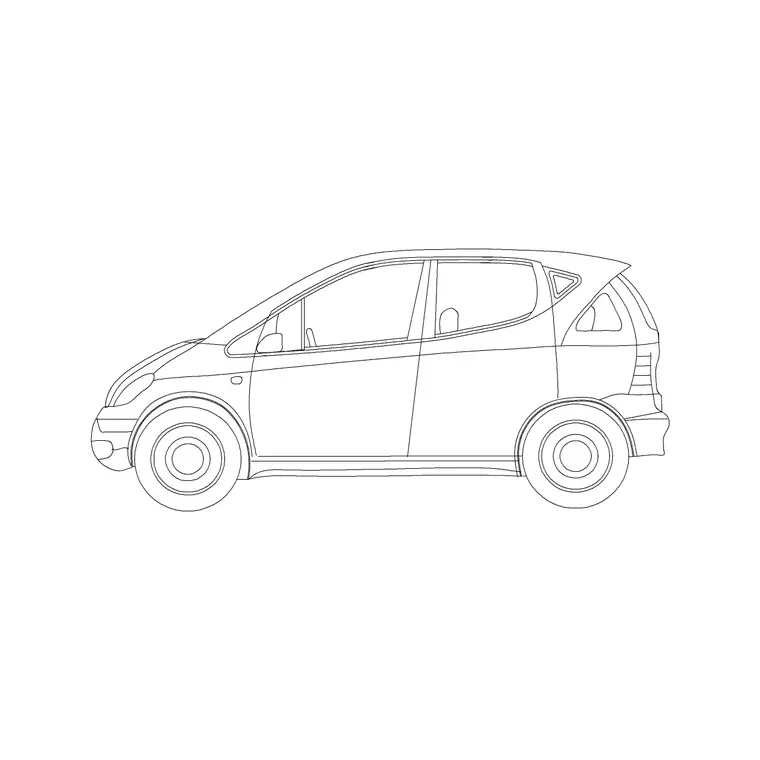
A mini car CAD block is the smallest passenger body in the catalogue — a city car or microcar with a very short wheelbase, the kind that slots into the tightest parking bay. It is the right block when you want a vehicle to read as small and economical, or when a narrow space simply will not take a full-size car. This page offers a free mini car block in DWG and DXF, drawn in side elevation at true scale for AutoCAD 2004 or later, free for personal and commercial use with no signup or watermark.
Reach for the mini car in compact urban scenes, tight driveways, micro-mobility studies and dense parking layouts where a smaller footprint matters. Drawn to scale, it instantly shows how a small car fits against doors, kerbs, bollards and people in the same drawing.
What the mini car block is
This is a side-elevation profile of a very small city car — a stubby bonnet, a short upright cabin and minimal overhangs. It is clean line geometry, so it prints sharply and stays light even when you scatter several across a busy street scene.
The block's defining trait is its compactness: a short wheelbase, a tall-for-its-length cabin and a near-vertical tail. That tiny silhouette reads unmistakably as a mini even beside a normal hatchback, which is exactly what you want when the drawing is meant to communicate small scale or efficient use of space.
View and what's included
The download is a side elevation — the car square-on from the kerb — suited to building elevations, street sections, tight-driveway studies and presentation boards. It sits naturally beside doors, shopfronts, bollards and figures drawn at the same scale.
The geometry is on sensible layers so you can recolour the body, mute the glazing or thin the wheels independently. Keep it as a single block reference and it copies, mirrors and rotates as one object — handy when filling a dense urban car-park elevation with small vehicles.
Typical sizing to design around
Use the block as a scale check, not a spec sheet. A mini or city car generally sits in the region of 2.7–3.7 m long, roughly 1.5–1.7 m wide and about 1.4–1.6 m tall — markedly shorter than a normal hatchback, with almost no front or rear overhang.
Those ranges help confirm the car looks right squeezed into a short bay or a narrow gateway. If it appears wrong, check insertion units before rescaling. Real microcars vary a lot, so scale to the envelope your scene needs rather than to a single fixed length.
How to insert the block
The DWG is full size in millimetres. In a millimetre drawing, insert at scale 1 for real size; in a metre drawing, insert at 0.001. On an imperial template, set INSUNITS to millimetres so AutoCAD rescales on insertion, or insert at 0.03937 to convert to inches.
Snap the insertion point to the car centreline, mirror to flip its facing, and copy as needed. As a block reference, a single BEDIT change to the definition updates every instance — convenient when you simplify the block for a small-scale plan.
Where mini car blocks are used
The mini car suits dense city schemes: compact urban streets, tight residential driveways, micro-mobility and car-share studies, and high-density parking layouts where small footprints unlock extra bays. It is also a good storytelling block when a drawing needs to show economy or constrained space.
Urban designers use it to test tight kerbside parking; architects use it on small-plot frontages; students reach for it because it is licence-clear. Mix it with hatchbacks and compact sedans from the vehicles category so a street shows a believable range of car sizes.
Using the mini car to make a point about space
Sometimes the mini car is not just background — it is the argument. When a drawing has to show that a constrained plot can still accommodate parking, a scaled mini squeezed into a short bay makes the case more honestly than pretending a full-size saloon fits. Designers use the mini precisely because its small envelope proves that even an awkward corner can take a car.
The same logic works on sustainability and car-share studies, where the point is that smaller vehicles use less kerb and less deck. Drop a row of minis next to a row of larger cars at the same scale and the saving in length is immediately visible to a client or a planner — a single illustration that does more than a paragraph of explanation.
The mini is also the friendliest car for testing the very tightest moves on a plan: a back-out from a single garage onto a narrow lane, or a turn within a small courtyard. If even the mini cannot complete the manoeuvre, the space genuinely will not work for any car, and you have found that out on the drawing rather than on site.
Free download
Browse the full library — DWG & DXF, no signup.
Questions
Frequently asked
Is the mini car CAD block free for commercial work?+
Yes. It downloads free in DWG and, where available, DXF, with no signup, no watermark and no attribution requirement, and it is cleared for commercial use.
How small is the mini car block on the drawing?+
Roughly 2.7–3.7 m long at full size — noticeably shorter than a normal hatchback. It is drawn to scale, so check your insertion units if it looks the wrong size.
Which view does the mini car block come in?+
Side elevation, the car seen square-on from the kerb. Use it for elevations and street sections; for parking layouts choose a plan-view vehicle block instead.
Will the mini car file open in older AutoCAD?+
Yes. The DWG targets AutoCAD 2004 and later and opens in AutoCAD, AutoCAD LT, BricsCAD, DraftSight and free DWG viewers.
Related downloads
Blocks for this guide
Related categories
Related guides
Block landing
Free Car Plan View CAD Block — DWG Download
Download a free car plan-view CAD block in DWG and DXF — the top-down footprint for parking layouts and site plans. AutoCAD 2004+, no signup.
Block landing
Free Car Elevation CAD Block — DWG Download
Download a free car elevation CAD block in DWG and DXF — side and front views for streetscapes, showrooms and presentations. AutoCAD 2004+, no signup.
Block landing
Free Sedan Car CAD Blocks — DWG Download
Download free sedan car CAD blocks in DWG and DXF — saloon and luxury sedans in plan and elevation for parking and showrooms. AutoCAD 2004+, no signup.