Block landing · luxury sedan car cad block dwg
Free luxury sedan car CAD block in DWG and DXF
By Sumana Kumar · Published 14 Aug 2025 · Updated 18 Apr 2026
A luxury sedan car CAD block is the long, full-size executive saloon you use when an elevation calls for a premium, generously-proportioned car rather than a compact runabout. This page offers a free luxury sedan block in DWG and DXF, drawn in side elevation at true scale so it sits correctly against a building frontage, a porte-cochere or a kerb. It is free for personal and commercial use — no signup, no watermark, no credit line.
The block suits hotel entrances, corporate and dealership drawings, upscale residential driveways and any scene where the car is meant to signal status. Because it is drawn to scale, it doubles as a reliable size reference against doors, columns, canopies and people placed in the same elevation.
What the luxury sedan block is
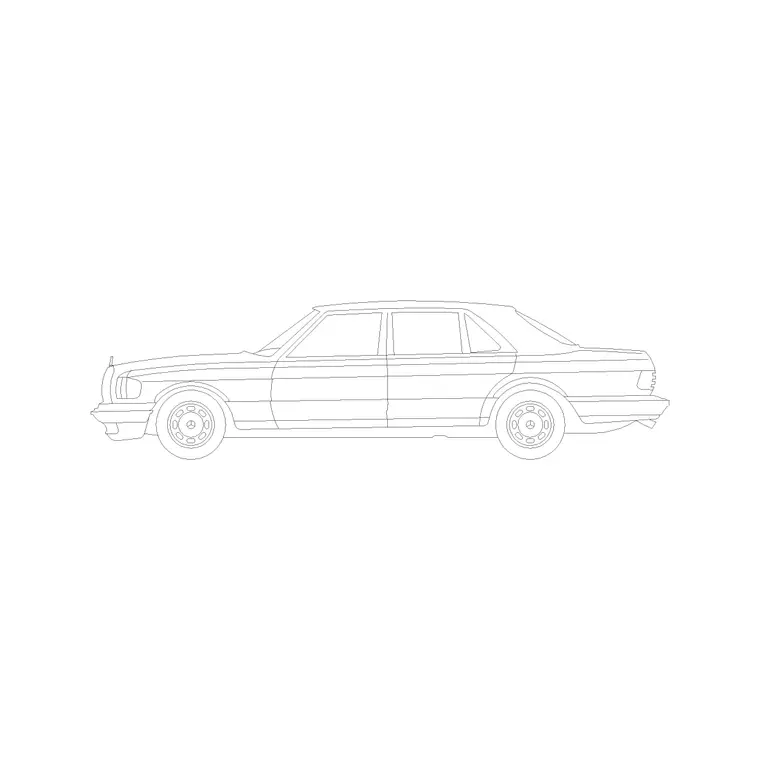
This is a side-elevation profile of a long-wheelbase, four-door executive saloon — a three-box body with a defined bonnet, cabin and boot, a long roofline and a full-length glasshouse. It is line geometry rather than a rendered picture, so it stays light and prints crisply at any plot scale.
The profile carries the cues that make a car read as a luxury sedan: the longer overhangs, the stretched rear door, the higher beltline and the more formal, level roof. Those proportions are what separate it from a compact saloon at a glance, which is the whole point when the car is there to set the tone of a frontage.
View and what's included
The download is a side elevation — the car seen square-on from the kerb, ideal for building elevations, entrance and canopy studies, street sections and presentation boards. It pairs naturally with the columns, canopies, signage and figures you draw at the same scale.
The geometry sits on tidy layers so you can recolour the body, soften the glazing or simplify the wheels without breaking the block apart. Keep it as a single block reference so it copies and mirrors as one object when you line up a row of arriving cars under a canopy.
Typical sizing to design around
Use the block as a scale check rather than a datasheet. A full-size luxury saloon generally falls in the region of 4.9–5.3 m long, around 1.85–1.95 m wide and roughly 1.45–1.5 m tall — noticeably longer than a compact sedan, with bigger front and rear overhangs.
Those ranges help you confirm the car reads correctly beside a 2.4 m doorway or a 3 m canopy column. If the proportions look off, suspect a units mismatch on insertion before doubting the block. Real models vary widely, so scale to the envelope your scene needs rather than to a single fixed length.
How to insert the block
The DWG is full size in millimetres. In a millimetre template, run INSERT and place it at scale 1 for real size; in a metre drawing, insert at 0.001. On an imperial template, set INSUNITS to millimetres so AutoCAD rescales on insertion, or use 0.03937 to convert to inches.
Pick an insertion point on the car's centreline and mirror it if the scene needs the car facing the other way. As a block reference it copies cleanly along a frontage, and a BEDIT change to the definition propagates to every instance — useful when you trim glazing detail for a small-scale plot.
Where luxury sedan blocks are used
The luxury sedan block shines in hotel and resort entrance elevations, corporate headquarters frontages, car-showroom and dealership drawings, gated residential driveways and high-end mixed-use schemes. It signals an upscale context the moment it lands beside a canopy or a marble-clad lobby.
Architects use it to set the tone of an arrival sequence; interior and retail designers use it in showroom elevations; landscape and urban designers use it to scale a forecourt. Combine it with compact and family cars from the vehicles category so the scene shows a believable mix rather than a fleet of identical premium saloons.
Setting the right tone with an arrival sequence
A luxury sedan does more than fill space — it tells the viewer what kind of building this is. Placed under a porte-cochere or beside a glazed lobby, the long saloon signals a hotel, a corporate headquarters or a premium residence before anyone reads the drawing's title block. Use that deliberately: position the car so its length runs parallel to the canopy and its roofline sits below the underside of the soffit, proving the clearance as you set the scene.
For a richer arrival view, combine the parked sedan with a figure stepping out and a doorman or valet block, all at the same scale. Keep each element on its own layer so you can dial the scene up for a presentation render and strip it back to a bare technical elevation when the drawing goes for coordination.
Free download
Browse the full library — DWG & DXF, no signup.
Questions
Frequently asked
Is the luxury sedan CAD block free to use commercially?+
Yes. It downloads free in DWG and, where available, DXF, with no signup, no watermark and no attribution requirement, and it is cleared for commercial work.
Which view is the luxury sedan block drawn in?+
Side elevation — the car seen square-on from the kerb, suited to building elevations, entrance studies and presentation boards. Use a plan-view vehicle block for parking layouts.
How long should a luxury sedan block be on the drawing?+
Roughly 4.9–5.3 m at full size — longer than a compact saloon. It is drawn to scale, so if it looks wrong, check your insertion units rather than rescaling by eye.
Can I open the file in a free DWG viewer?+
Yes. The DWG targets AutoCAD 2004 and later and opens in AutoCAD, AutoCAD LT, BricsCAD, DraftSight and free viewers such as Autodesk's online DWG viewer.
Related downloads
Blocks for this guide
Related categories
Related guides
Block landing
Free Car Plan View CAD Block — DWG Download
Download a free car plan-view CAD block in DWG and DXF — the top-down footprint for parking layouts and site plans. AutoCAD 2004+, no signup.
Block landing
Free Car Elevation CAD Block — DWG Download
Download a free car elevation CAD block in DWG and DXF — side and front views for streetscapes, showrooms and presentations. AutoCAD 2004+, no signup.
Block landing
Free Sedan Car CAD Blocks — DWG Download
Download free sedan car CAD blocks in DWG and DXF — saloon and luxury sedans in plan and elevation for parking and showrooms. AutoCAD 2004+, no signup.