How-to guide · how to insert a stove block in autocad
How to insert a stove or cooktop block in AutoCAD
By Sumana Kumar · Published 3 Aug 2025 · Updated 6 May 2026
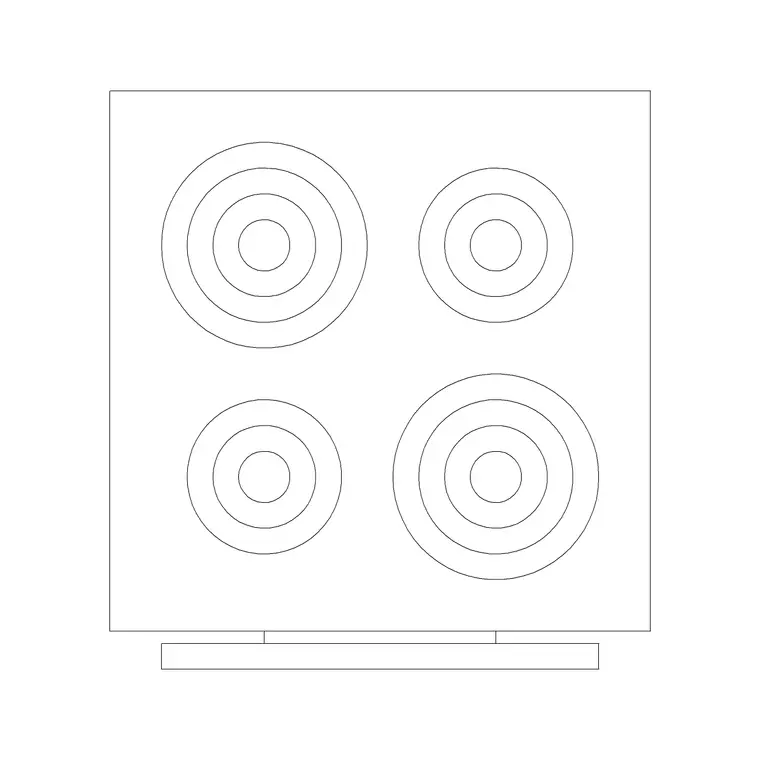
A hob or cooktop is the heart of the kitchen work triangle, so where you drop the block matters as much as how. Unlike the sink, the cooktop is rarely fixed by plumbing — you place it where the cooking flow makes sense, then make sure the worktop either side gives a landing zone for hot pans and the wall behind it can carry a hood. This guide covers inserting a stove or cooktop block in AutoCAD, centring it cleanly in its base unit, and respecting the clearances a real installation needs.
The worked example is a four-burner gas hob, the most common residential cooktop and the one drafters reach for constantly. The steps transfer directly to induction and ceramic cooktops, five-burner ranges and freestanding cookers, so learn this once and you can place any cooking appliance.
Step 1 — Pick the cooktop that matches the cabinet
Download a hob or cooktop block in DWG, choosing the plan view for layout work — drawn from above so the burners or zones read clearly. Match the appliance width to the base cabinet it drops into: a four-burner hob is typically 600 mm wide and sits in a 600 mm unit, while a five-burner or range-style cooktop runs 900 mm and needs a 900 mm unit.
A built-in cooktop sits within a continuous worktop, so the block you want shows just the hob outline and burner positions, not a full freestanding cooker with an oven below. If you are drawing a freestanding range cooker, grab that block instead — it carries the oven body and a different footprint. Save the DWG to a library folder; the blocks here are full size in millimetres.
Step 2 — Confirm units, then insert
As with any DWG block, set your insertion units before placing. Type UNITS and check 'Insertion scale' reads Millimeters so the 600 mm hob arrives at 600 mm and not 0.6 mm or 600 metres. Getting INSUNITS right lets AutoCAD reconcile the block's units with the drawing's automatically.
With units sorted, type INSERT (or I), browse to the cooktop DWG, and place it on the worktop with 'Specify On-screen' ticked for the insertion point. Leave the scale at 1. The cooktop drops in as a single block reference, ready to be aligned precisely in the next step.
Step 3 — Centre the hob in its base unit
A hob centred in its cabinet looks right and builds right. Use MOVE with a midpoint-to-midpoint snap: pick the midpoint of the hob's front edge, then snap it to the midpoint of the cabinet's front edge so the appliance sits symmetrically in the unit. Pull the hob forward off the back wall by the worktop overhang, conventionally around 50 mm, so the burner controls and the upstand have room.
If the cooktop sits in a run of units rather than a single dedicated cabinet, align its centreline to the midpoint of the gap you have left for it. A construction line down the centre of the intended position makes the snap unambiguous, especially when you are fitting the hob between two cabinet modules.
Step 4 — Leave the cooking clearances
A cooktop is the one kitchen appliance with real safety clearances, and the drawing should respect them. Leave a landing zone of worktop on at least one side — ideally both — so there is somewhere to set a hot pan; 300–400 mm of clear worktop beside the hob is a sensible target. Don't butt the hob straight up against a tall unit or a wall return on both sides.
Vertically, a range hood typically hangs 650–750 mm above a gas hob (a little less for induction), so check the cooktop centreline lines up with where the hood will go. Keep combustible materials — a tall larder, a wall cabinet without a hood — out of the zone directly above and immediately beside the burners. These are the clashes a kitchen reviewer looks for first.
Step 5 — Layer it and link it to the hood
Move the cooktop onto an appliance layer rather than layer 0, so you can freeze appliances for a clean cabinet plan and give the cooking equipment its own colour. Because the hob and the hood are a pair, it helps to align them now: insert or note the hood position directly above the hob centreline so the elevation and the ventilation drawing stay coordinated.
Tag the cooktop with an attribute carrying its fuel type and width if you are producing an appliance schedule. When the kitchen is finalised, you can WBLOCK the hob with its base unit as a reusable assembly, which speeds up repeating the same cooking station across multiple units in a residential scheme.
Mistakes to avoid with cooktops
The classic error is the units mismatch — if the hob arrives wildly out of scale, fix INSUNITS rather than scaling by hand. Next is placing the cooktop in a corner or hard against a wall return with no landing space; a hob with no worktop beside it is unsafe in reality and reads as a planning mistake on the drawing.
Another is forgetting the relationship to the hood and the sink. Convention puts the hob and the sink on the same run or adjacent runs, never directly facing each other across a narrow galley where someone carrying a hot pan would meet someone at the sink. And don't place a hob directly under a window — an open flame below an opening window is both a code issue and a real hazard, so if the only spot is under a window, switch to an induction or ceramic cooktop and note the constraint.
Free download
Browse the full library — DWG & DXF, no signup.
Questions
Frequently asked
What's the difference between a hob block and a cooker block?+
A hob or cooktop block shows only the cooking surface that drops into a worktop — burners or zones seen from above. A freestanding cooker block includes the oven body below the hob, so it has a deeper footprint and is a standalone appliance rather than a built-in one.
How much clearance should I leave beside a cooktop?+
Aim for 300–400 mm of clear worktop on at least one side of the hob as a landing zone for hot pans, ideally on both sides. Avoid butting the cooktop against a tall unit or wall return with no worktop beside it.
Can I place a cooktop under a window?+
Avoid it for gas — an open flame under an opening window is a code and safety concern. If the layout forces a hob under a window, switch to an induction or ceramic cooktop, which has no flame, and note the constraint on the drawing.
How do I keep the hob and the hood aligned?+
Place the hood directly above the hob's centreline. Drop a construction line down the hob centre and snap the hood to it, so the plan, the elevation and the ventilation drawing all agree on the cooking station's position.
Related downloads
Blocks for this guide
Popular blocks to download
Related categories
Related guides
How-to guide
How to Draw a Kitchen Layout in AutoCAD
Draw a kitchen layout in AutoCAD — set the 600 mm module, fix sink and hob, lay cabinet runs, check the work triangle. Step-by-step with free kitchen blocks.
How-to guide
How to Insert a Kitchen Sink Block in AutoCAD
How to insert a kitchen sink block in AutoCAD — download the DWG, fix units, run INSERT, snap it to the cabinet run and centre the bowl under the window.
How-to guide
How to Insert a Refrigerator Block in AutoCAD
How to insert a refrigerator block in AutoCAD — download the fridge DWG, set units, run INSERT, place it at the work-triangle corner and allow door clearance.