How-to guide · how to insert a dining table block in autocad
How to insert a dining table block in AutoCAD
By Sumana Kumar · Published 14 Aug 2025 · Updated 9 Mar 2026
A dining table block is one of the more demanding pieces of furniture to place well, because it is not just a footprint — it carries chairs, and the chairs need room to pull out and a person to walk behind them. Drop it carelessly and a six-seater that looked fine on paper turns out to block the route to the kitchen the moment someone sits down. This guide shows how to insert a dining table block in AutoCAD and position it so the whole dining zone actually works.
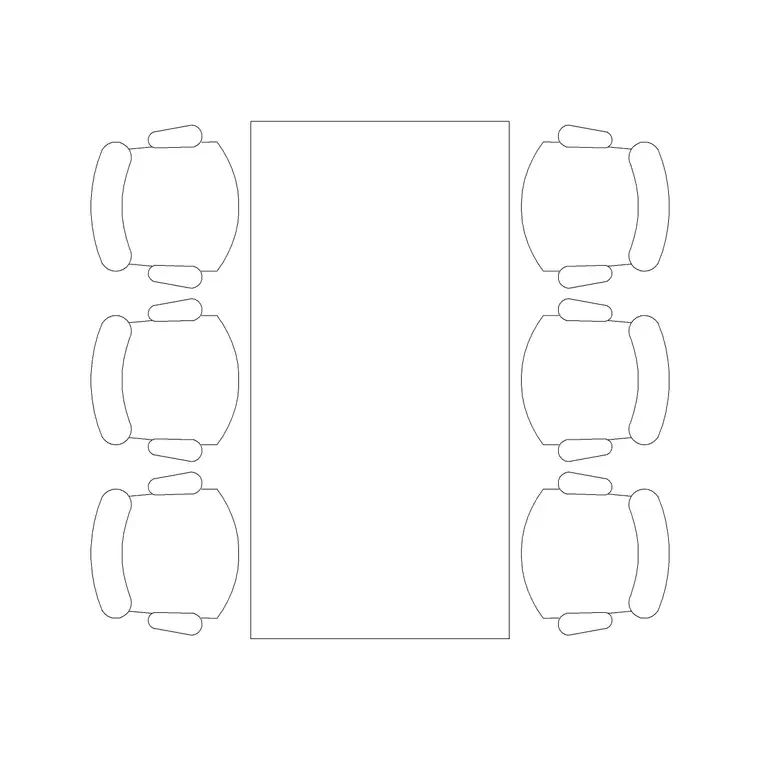
We will use a plan-view dining set as the example — a rectangular table with its chairs already arrayed — and cover both inserting a complete set and building one up from a bare table plus separate chair blocks. The same INSERT mechanics apply to round, square and extending tables.
Step 1 — Choose a table to match the seating count
Dining tables are sized by how many people sit at them, and the footprint grows fast. As a rough guide, a four-seater rectangular table runs about 1200 × 800 mm, a six-seater about 1600–1800 × 900 mm, and an eight-seater 2000–2400 × 1000 mm. Round tables seat four comfortably at around 1000–1100 mm diameter and six at about 1300–1500 mm. Pick the block whose seat count matches the brief rather than squeezing extra chairs onto a small top.
Many dining blocks ship as a complete set — table plus chairs already spaced — which saves you arraying the seating yourself. Download the DWG into a library folder and note that it is drawn full size in millimetres.
Step 2 — Match units, then run INSERT
Check UNITS first: set 'Insertion scale' to Millimeters so AutoCAD rescales the block correctly if its units differ from your template's. Then type INSERT, browse to the dining-set DWG, and choose it from the Blocks palette.
Leave the insertion point on 'Specify On-screen'. The natural base point for a dining set is the centre of the tabletop, because that is the point you want to align with the room and, often, with a pendant light above. Click to place it roughly in the dining zone — it arrives as one block reference covering the table and all the chairs.
Step 3 — Centre the table and rotate to the room
Move the set so the table centre sits where you want it — frequently centred on the window, the dining-area wall, or directly under a ceiling light. Use MOVE with a midpoint or centre snap to land it precisely, and ROTATE if the table's long axis should run a particular way (usually parallel to the longest wall so chairs aren't pushed into a doorway).
If you are coordinating with a reflected ceiling plan, line the table centre up with the pendant or chandelier position now, because the light is almost always meant to sit over the middle of the table.
Step 4 — Check the chair pull-out and walkway clearances
This is where a dining block earns its keep. Each diner needs roughly 600 mm of clear depth from the table edge to pull a chair out and sit, and about 750–900 mm from the table edge before you hit a wall or another piece of furniture if someone also has to walk behind the seated diners. Around 1100 mm from table edge to wall is the comfortable figure when a circulation route passes behind the chairs.
Because the set is drawn to true size, you can draw or measure these offsets straight off the plan. If the clearance is tight on one side, nudge the whole set toward the more generous wall, or step down to a smaller table or a bench on the wall side.
Step 5 — Build a custom set from table plus chairs
If the room calls for a seat count the ready-made set doesn't offer, build your own. Insert a bare table block, then insert a single dining-chair block and position it centred on one long edge with the 600 mm pull-out gap. Use ARRAY (rectangular) to repeat the chair along that edge at equal spacing, then MIRROR the row to the opposite edge, and add end chairs if the table takes them.
Keep table and chairs on the furniture layer, then — once the arrangement reads well — WBLOCK the whole thing as a named dining set so you can reuse it. Editing that block later in BEDIT updates every place it appears.
Common pitfalls when placing dining tables
The most frequent error is forgetting the pull-out zone: the table fits the room, but a chair can't be drawn back without hitting a wall. Always check the 600 mm seat clearance on every occupied edge. A second pitfall is ignoring the circulation route — a dining table often sits on the path between the kitchen and the living area, and a seated diner can block it entirely if you haven't kept the ~1100 mm behind-chair gap.
Finally, watch the units: a dining set is large enough that a millimetre-versus-metre mismatch is glaring, so if the table lands a thousand times too big, fix INSUNITS rather than scaling. And if you explode the set to edit one chair, re-block it afterward so it stays a single, schedulable object.
Free download
Browse the full library — DWG & DXF, no signup.
Questions
Frequently asked
How much space should I leave around a dining table in AutoCAD?+
Allow about 600 mm from the table edge for a chair to pull out, and around 1100 mm where a walkway passes behind seated diners. The block is drawn to true size, so you can measure these clearances directly on the plan.
Should the dining table be centred under the light?+
Usually, yes. Insert the set using the tabletop centre as the base point, then align that centre with the pendant or chandelier position on your reflected ceiling plan so the light sits over the middle of the table.
How do I add more chairs to a dining table block?+
Insert a single dining-chair block at the correct pull-out distance, then use a rectangular ARRAY along the table edge to repeat it, and MIRROR the row to the opposite side. Re-block the whole set afterward to keep it as one object.
What size dining table seats six people?+
A six-seater rectangular table is typically around 1600–1800 mm long by 900 mm deep; a round six-seater is about 1300–1500 mm in diameter. Choose the block that matches your seat count rather than overloading a smaller top.
Related downloads
Blocks for this guide
Popular blocks to download
Related categories
Related guides
How-to guide
How to Edit a Block in AutoCAD (BEDIT)
Edit a block in AutoCAD with BEDIT — open the Block Editor, change the geometry, save, and update every inserted instance at once. Tips and pitfalls.
How-to guide
How to Explode a Block in AutoCAD (EXPLODE)
How to explode a block in AutoCAD with EXPLODE — break a block into editable lines, handle nested blocks, and use BURST to keep attributes.
How-to guide
How to Rename a Block in AutoCAD (RENAME)
How to rename a block in AutoCAD with RENAME — change a block's name without breaking its references, fix imported names, and apply a convention.