How-to guide · how to insert a curtain block in autocad
How to insert a curtain block in AutoCAD
By Saumyajit Maity · Published 28 Apr 2024 · Updated 30 Apr 2026
Curtains are mostly an elevation and presentation block — they soften an interior elevation, show a window dressed, and tell a client how a room will feel rather than how it is built. Unlike a sofa or a bed, a curtain rarely changes a layout; its job is to read convincingly over a window at the right height and width. This guide covers inserting a curtain block in AutoCAD, mainly in elevation, and stretching it to fit the actual window opening.
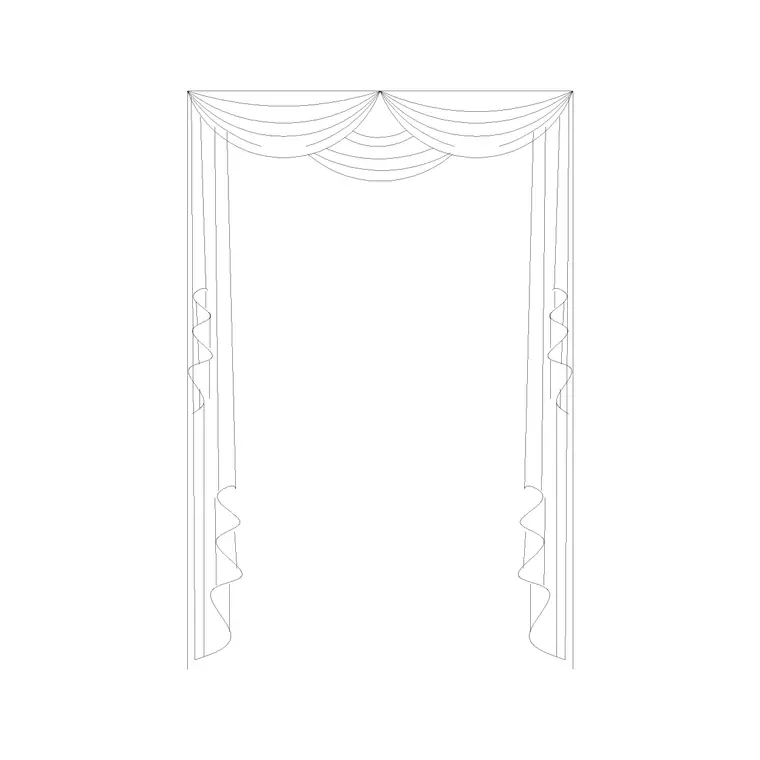
We will use a curtain elevation block — the folded drapery seen face-on — as the worked example, and touch on the small plan symbol curtains sometimes get. The drape folds and pelmet detail are what make a curtain block look like fabric rather than a box, so we will treat it as a presentation element first.
Step 1 — Choose the elevation curtain you need
Curtains are specified by how they hang: full-length floor curtains, sill-length curtains, café curtains, or sheers. Pick the elevation block that matches the look — a pinch-pleat drape reads very differently from a simple gathered curtain or a roman blind. Because curtains are a face-on element, you almost always want the elevation view rather than a plan.
Note whether the block includes a pelmet or curtain pole at the top and a tieback, since those details sell the drawing. Save the DWG to your library; it is drawn full size in millimetres so it lands at real height over a real window.
Step 2 — Set units and insert over the window
Confirm UNITS is set to Millimeters for the insertion scale. Run INSERT, browse to the curtain DWG, and place it with the insertion point on 'Specify On-screen'. A useful base point is the top centre or a top corner of the curtain, because you align the pole or pelmet with the head height above the window.
Insert the curtain on the same interior elevation where the window already sits, so they share a ground line and a wall. The curtain arrives as a single block reference covering the drape, pole and any tieback.
Step 3 — Set it on the ground line and at head height
A floor-length curtain should touch — or just kiss — the finished floor, so MOVE it so the hem sits on the ground line of your elevation. The pole or pelmet typically hangs a little above the window head and slightly wider than the opening, so the curtain can stack clear of the glass when open. Position the head accordingly rather than placing the pole exactly on the window top.
For a sill-length curtain, drop the hem to the sill line instead of the floor. Getting the vertical extents right — head above the window, hem on floor or sill — is what makes the curtain read as correctly hung.
Step 4 — Stretch the curtain to the window width
Windows vary, so the curtain almost always needs to widen or narrow to suit. If it is a static block, use STRETCH: window the side you want to move and drag it so the drape covers the opening with a little overlap each side. Because curtains gather, a curtain block usually shows more fabric width than the bare opening, which is correct — a drawn curtain spanning exactly the glass looks mean.
If the curtain is a dynamic block with a width parameter, just pull the grip. Either way, keep the fold pattern looking even after stretching so the fabric still reads as gathered rather than smeared.
Step 5 — Layer and coordinate with the window
Put the curtain on a soft-furnishings or interior-finishes layer, separate from the architectural window, so you can show a bare window for the construction elevation and a dressed window for the presentation elevation from the same drawing. Giving curtains their own layer also lets you set a lighter lineweight so the fabric doesn't compete with the structure.
If the project shows the same window dressing repeatedly — a row of identical hotel windows, say — WBLOCK the curtain at its set width and array it. Keep it as a block reference so it stays editable from one definition if the client changes the fabric style.
Tips and pitfalls for curtain blocks
The commonest mistake is treating a curtain like a structural element and putting it on the window layer, so you can't produce a clean construction elevation without deleting drapery. Keep curtains on their own finishes layer. The second is hanging them at the wrong extents — a floor curtain that stops short of the floor, or a pole sitting exactly on the window head with no stacking room — which instantly looks wrong.
Also resist drawing the curtain only as wide as the glass: real curtains overlap the opening and gather, so a little extra width each side reads correctly. And if you only need to suggest curtains on a plan, a short hatched arc at the window is enough — the detailed fabric belongs in elevation.
Free download
Browse the full library — DWG & DXF, no signup.
Questions
Frequently asked
Are curtain blocks plan or elevation?+
Curtains are mainly an elevation element — the drapery seen face-on over a window. A plan sometimes shows a small hatched symbol at the window, but the detailed fabric, folds and pole belong in the interior elevation.
How do I make a curtain block fit my window?+
Use STRETCH on a static block to widen or narrow the drape so it overlaps the opening a little each side, or pull the width grip on a dynamic block. Keep the fold pattern even after stretching so the fabric still reads as gathered.
How high should I hang a curtain in elevation?+
Set the pole or pelmet a little above the window head and slightly wider than the opening, and drop the hem to the finished floor for a full-length curtain or to the sill for a sill-length one. The block is drawn to real height so it lands correctly.
What layer should curtains go on?+
Put curtains on a soft-furnishings or interior-finishes layer, separate from the architectural window. That lets you produce a bare-window construction elevation and a dressed-window presentation elevation from the same drawing.
Related downloads
Blocks for this guide
Popular blocks to download
Related categories
Related guides
How-to guide
How to Insert a Mirror Block in AutoCAD
Insert a mirror block in AutoCAD: place a wall mirror in elevation at the right height, show the thin plan symbol, and avoid confusing the MIRROR command.
Room guide
Master Bedroom CAD Blocks & Layout — DWG
Free master bedroom CAD blocks in DWG — king and double beds, side tables, wardrobes, seating and lighting to lay out a master suite in AutoCAD.
Room guide
Kids Bedroom CAD Blocks & Plan — DWG
Free kids bedroom CAD blocks in DWG — single beds, wardrobes, desks and play space to plan a child's room in AutoCAD with real clearances.