Block landing · standing lamp cad block
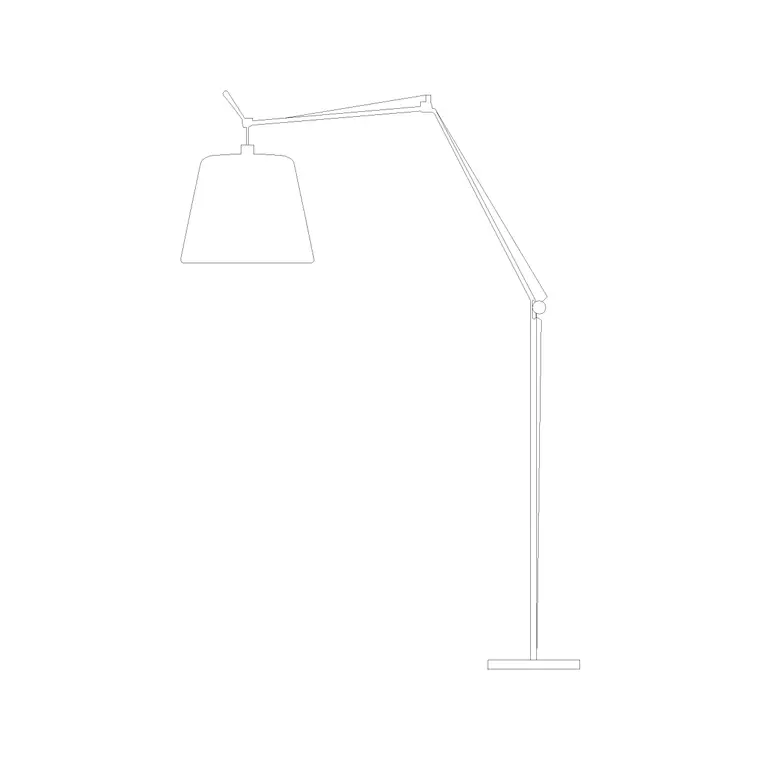
Free standing lamp CAD blocks in DWG and DXF
By Sumana Kumar · Published 12 Feb 2024 · Updated 20 Jan 2026
A standing lamp is the tall, free-standing light you set on the floor to throw light upward or outward — the uplighter in a corner, the slim column beside a desk, the statement standing lamp in a hotel lounge — and a scaled standing lamp CAD block lets you show that vertical lighting accent without rebuilding a tall column and shade each time. This page collects free standing lamp CAD blocks in DWG and DXF, drawn at true millimetre dimensions for AutoCAD 2004 or later. Everything is free for personal and commercial work, with no signup and no watermark.
A standing lamp occupies floor space and reads strongly in elevation because of its height, so it earns a place in both the furniture plan and the interior elevation. Use these blocks to dress lounges, hotel and office lobbies, reading corners, bedrooms and reception areas, and to add vertical interest to an interior elevation where a wall would otherwise read flat.
What a standing lamp block adds to a scheme
A standing lamp is a floor-standing fitting whose job, more often than not, is to add a vertical lighting accent and to push light up a wall or across a corner. In plan it reads as a base footprint you space against furniture and keep out of walkways. In elevation it is a tall, slender silhouette — a slim column rising to a shade, an uplighter bowl, or a sculptural head — that gives a wall or corner composition height and rhythm.
Because it is an accent and a floor item at once, the block carries weight in both drawings. On the furniture plan it shows the corner is occupied and lit; on the interior elevation it breaks up a blank wall and gives the eye somewhere to travel. It sits on an accessory or lighting layer you can freeze for the technical issue and thaw for the presentation set.
Standing lamp, floor lamp, or reading lamp?
These names overlap, so it helps to be clear about how the blocks differ in use. A standing lamp emphasises height and presence — often an uplighter or a tall statement column that lights a wall or corner. A floor lamp is the general free-standing lamp beside seating, frequently with a downward or sideways shade for ambient light. A reading lamp is the task variant, with an adjustable or directional head aimed at a seat. The geometry can be similar, but choosing the right block sets the right design intent in the drawing.
In practice you mix them: a standing uplighter in a corner, a floor lamp behind a sofa, a reading lamp by a chair. Because all three sit in the lighting category here, you can build a layered, believable lighting scheme from one consistent set of blocks.
Typical standing lamp dimensions to design around
Use these ranges as you scale a standing lamp. Overall height: commonly 1500–1800 mm, with tall statement and uplighter lamps reaching 1800–2000 mm. Base diameter: 250–400 mm for stability. Shade or head diameter: 250–450 mm, smaller for a directional uplighter bowl.
The figure to watch is the height against the room and the wall behind. An uplighter that washes a wall wants to sit comfortably below the ceiling so the light spreads rather than hits the ceiling in a tight pool, and a tall standing lamp beside seating should read in proportion to the chair or sofa next to it. Dropping the scaled block into the elevation makes that proportion judgement immediate rather than guesswork.
How to insert and place the block
These standing lamp blocks are drawn full size in millimetres. Insert at scale 1 in a millimetre drawing, 0.001 in a metre drawing, or set INSUNITS to millimetres so AutoCAD rescales on insertion.
Run INSERT or drag the DWG from a tool palette, snap the insertion point to the centre of the base, and place it in a corner or beside seating in plan — keeping the base clear of circulation. In elevation, stand it on the floor line against the wall it lights. Because the lamp is a single block reference, you can copy and mirror it around a symmetrical lounge and rotate the head of a directional standing lamp toward the wall or seat.
Where standing lamp blocks are used
Standing lamps appear in living rooms and lounges, hotel and office lobbies, reception areas, reading corners, bedrooms and waiting rooms — anywhere a layered lighting scheme wants a vertical floor-standing accent. They are common in residential and hospitality interiors where the lighting is part of the atmosphere rather than purely functional. In a lighting layout they signal a floor-standing fitting that needs a nearby socket rather than ceiling wiring.
Pair the standing lamp blocks with floor lamp, table lamp and wall light blocks to build a complete lighting layer, and with sofa, armchair and console blocks from the furniture set to compose the room. As licence-clear blocks they suit presentation drawings, FF&E packs and student schemes.
Using vertical accents to balance an elevation
Interior elevations often suffer from being too horizontal — a run of low furniture against a long wall with nothing to carry the eye upward. A standing lamp is one of the simplest ways to fix that, and because it is a scaled block you can test the effect quickly. Drop a tall standing lamp into the corner or beside a sofa in the elevation and the composition gains a vertical that balances the horizontal furniture line, much as a tall plant or a piece of art would.
The practical discipline is the same as for any floor item: keep the base out of the circulation path in plan, and provide a socket or floor box for the cable. Keeping the standing lamps on a dedicated accessory layer means the same drawing serves a clean technical elevation with the lamps frozen and a fully dressed presentation elevation with them thawed. Tagging each with a specification reference lets the decorative floor lighting flow into the FF&E schedule alongside the rest of the loose furniture and lighting.
Free download
Browse the full library — DWG & DXF, no signup.
Questions
Frequently asked
What's the difference between a standing lamp and a floor lamp?+
The terms overlap, but a standing lamp tends to emphasise height and presence — often an uplighter or tall statement column lighting a wall or corner — while a floor lamp is the general free-standing lamp beside seating. Both are floor-standing and drawn full height.
Is the standing lamp drawn in plan or elevation?+
Both, where available. The plan shows the base footprint for the furniture layout, and the elevation shows the full height where the lamp does its visual work. Where both views are in one DWG, insert the one you need and freeze the other.
What scale are the standing lamp blocks drawn at?+
Full size in millimetres. Insert at scale 1 in a millimetre drawing, 0.001 in a metre drawing, or set INSUNITS to millimetres so AutoCAD rescales automatically on insertion.
Are the standing lamp blocks free for commercial use?+
Yes. Every block downloads free in DWG and, where available, DXF, with no signup, no watermark and no attribution requirement, and they are cleared for commercial project use.
Related downloads
Blocks for this guide

Popular blocks to download
Related categories
Related guides
Block landing
Free Lighting Fixtures CAD Blocks — DWG Download
Download free lighting fixtures CAD blocks in DWG and DXF — chandeliers, wall lights, downlights and pendants in plan and elevation for AutoCAD.
Block landing
Free Table Lamp CAD Blocks — DWG Download
Download free table lamp CAD blocks in DWG and DXF — classical and decorative table lamps in plan and elevation for AutoCAD 2004+. No signup, commercial-use OK.
Block landing
Free Floor Lamp CAD Blocks — DWG Download
Download free floor lamp CAD blocks in DWG and DXF — straight and arc floor lamps in plan and elevation for AutoCAD 2004+. No signup, free for commercial use.