Block landing · round chandelier cad block
Free round chandelier CAD blocks for AutoCAD
By Sumana Kumar · Published 25 Feb 2023 · Updated 18 Jan 2026
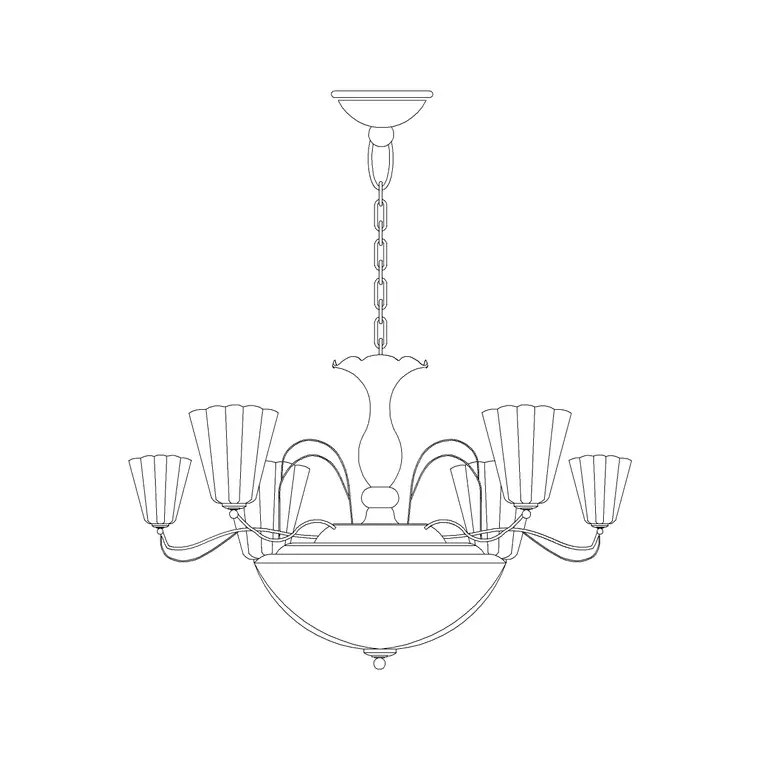
A round chandelier is the centrepiece fitting you place under a high or feature ceiling — a circular frame or ring carrying multiple lamps, hung over a dining table, a lobby or the centre of a stair void. This page offers a free round chandelier CAD block in DWG and DXF, drawn to true millimetre size so its circular footprint and drop read correctly the instant you insert it. Everything is free for personal and commercial work, with no signup and no watermark.
Unlike a single pendant, a round chandelier has real plan presence: its diameter often governs how the rest of the ceiling is composed, so getting it to scale matters. Drop the block onto a reflected ceiling plan and you can centre it over the table, check that its diameter is comfortably smaller than the table or rug beneath it, and confirm the drop clears head height in a double-height space — all from the geometry rather than a guess.
What counts as a round chandelier
A round chandelier reads in plan as a circle or a concentric ring of lamps rather than a single point of light. It might be a classic multi-arm frame, a modern LED ring or a cluster of bulbs arranged on a circular plate. What unites them for drawing purposes is the circular footprint and the fact that they are a feature — the eye is meant to land on them — so they are usually centred deliberately within a space.
The block here is a single clean reference: the outer ring, the lamp positions and the suspension all read as one object you can centre, scale and rotate. Because the lamps sit on the ring, the plan symbol communicates the diameter clearly, which is the dimension that drives the rest of the ceiling composition.
Views and what's included
The plan / reflected-ceiling-plan view shows the chandelier as a circle (often with the individual lamp positions marked) seen from below — this is what you centre over a table and dimension to the walls. The elevation or side view shows the chandelier hung at its drop, with the ring and arms drawn face-on, which you place in an interior elevation or section to prove the fitting clears head height and sits at the intended level.
Where both views ship in one DWG, a single download serves the reflected ceiling plan and the room elevation. For a busy multi-arm frame you may want to simplify the elevation for a small-scale sheet — explode the view you are editing rather than the whole block.
Typical sizing to design around
These are typical ranges, not fixed specs — always confirm against the actual fitting. Round chandeliers commonly span 600–1200 mm in diameter for a residential dining or hall fitting, and larger statement pieces in lobbies, ballrooms and double-height halls can run well beyond that. A useful rule of thumb is to keep the chandelier diameter comfortably narrower than the table or rug it sits over so it reads as centred rather than overhanging.
Drop is set by ceiling height: over a dining table the underside typically sits 700–900 mm above the surface, while in a double-height void the same fitting may hang two or three metres down to bring it into the room. Because the block is scaled, insert it, dimension the diameter against the table and the drop against the floor, and the proportions are easy to judge.
How to insert and centre the block
The block is drawn full size in millimetres; insert at scale 1 in a millimetre drawing, 0.001 in a metre template, or set INSUNITS to millimetres so AutoCAD rescales on insertion. Run INSERT, snap the insertion point to the centre of the ring, and centre it on the table or room. A quick way to centre is to draw the diagonals of the table or run a temporary centreline and snap the chandelier's centre to their intersection.
For the elevation, snap the suspension top to the ceiling line so the drop reads against the floor. Keep the fitting on a dedicated lighting layer so you can produce a clean architectural plan by freezing the lighting and a full reflected ceiling plan by thawing it.
Where round chandeliers are used
Round chandeliers belong over dining tables and breakfast rooms, in entrance halls and lobbies, beneath stair voids and in double-height living spaces, and in hospitality settings — hotel reception, restaurants, function rooms — where a single feature fitting anchors the room. They read as the focal point, so they tend to drive the symmetry of the ceiling and the placement of the surrounding downlights.
Use the round chandelier with the rest of the lighting category: recessed downlights for the general wash, wall lights for the perimeter, and suspended pendants for secondary feature points. On a coordinated set, the same scaled symbol lets the electrical engineer hang the feature circuit and the structural engineer confirm the fixing point can carry the load — chandeliers are heavy, and that fixing detail starts from a correctly-placed block.
Layering and scheduling the feature fitting
Put the round chandelier on the lighting layer with the rest of the fittings, but consider giving feature luminaires their own sub-layer or a distinct colour so they stand out on a busy reflected ceiling plan. That makes it easy to talk about the feature lighting separately from the general lighting in a design review.
Tag the chandelier with a luminaire-type attribute — a feature code such as FL-01 — so it appears in the lighting schedule the electrical contractor and cost plan work from. Because a chandelier is a notable cost and a notable load, having it tagged and dimensioned straight from the drawing keeps the schedule, the structural fixing and the architectural intent in step. If the same fitting recurs across several rooms, insert the block rather than copying geometry, so a later substitution updates everywhere through the block definition.
Free download
Browse the full library — DWG & DXF, no signup.
Questions
Frequently asked
How big should a round chandelier be over a dining table?+
Keep the chandelier diameter comfortably narrower than the table or rug beneath it so it reads as centred. Residential round chandeliers commonly span 600–1200 mm; the block is to scale, so dimension it against the table to confirm.
Does the block include both plan and elevation views?+
Where a fitting ships both, the plan view gives the circular reflected-ceiling-plan symbol and the elevation shows the chandelier at its drop. They live in the same DWG, so one download covers both sheets.
Is the round chandelier CAD block free for commercial use?+
Yes. It downloads free in DWG and DXF with no signup, no watermark and no attribution requirement, and it is cleared for commercial project use.
How do I centre the chandelier over a table in AutoCAD?+
Snap the block's centre insertion point to the table's centre — draw the table diagonals or a temporary centreline and snap to their intersection. The block centres on the ring, so it lands correctly the first time.
Related downloads
Blocks for this guide


Related categories
Related guides
Block landing
Free Lighting Fixtures CAD Blocks — DWG Download
Download free lighting fixtures CAD blocks in DWG and DXF — chandeliers, wall lights, downlights and pendants in plan and elevation for AutoCAD.
Block landing
Free Table Lamp CAD Blocks — DWG Download
Download free table lamp CAD blocks in DWG and DXF — classical and decorative table lamps in plan and elevation for AutoCAD 2004+. No signup, commercial-use OK.
Block landing
Free Floor Lamp CAD Blocks — DWG Download
Download free floor lamp CAD blocks in DWG and DXF — straight and arc floor lamps in plan and elevation for AutoCAD 2004+. No signup, free for commercial use.