Curated pack · reception furniture cad blocks
Free reception furniture CAD blocks for AutoCAD
By Saumyajit Maity · Published 11 Oct 2023 · Updated 30 Mar 2026
The reception is the first room anyone sees, so it's the one most worth dressing properly in a drawing. This free reception furniture pack gathers the front-of-house blocks you reach for most — reception desks, waiting-area sofas and armchairs, coffee and side tables, and the planters and accessories that warm a lobby — drawn in plan and elevation, in DWG and ready to insert into AutoCAD 2004 or later. Everything is free for personal and commercial work, with no signup, no watermark and no attribution needed.
Use the pack to lay out office lobbies, hotel and clinic receptions, showroom front desks and any waiting area. Because the blocks are drawn at believable footprints, a reception desk lands with room for a queue and an accessible approach, the waiting seating fits without crowding the circulation, and you can check the entrance flow the moment the furniture hits the plan.
A reception also has to balance two jobs: it has to feel welcoming and it has to handle flow — people arriving, queuing, waiting and being directed onward. Scaled blocks let you test both at once: enough seating, a clear path from door to desk to lift or corridor, and an accessible counter section at the desk. Keeping the furniture on its own layer lets you produce a clean circulation plan, a furniture plan and a presentation elevation from the same drawing.
What's in the reception furniture pack
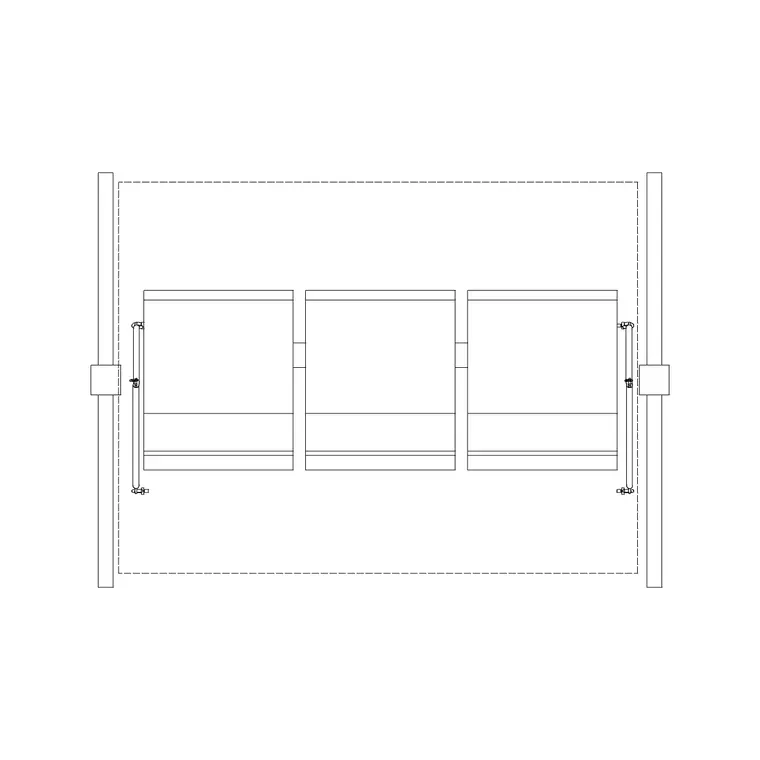
The pack covers the front-of-house kit. The desk: straight and L-shaped reception desks, with a lower accessible section for seated and wheelchair-using visitors. Waiting seating: two- and three-seat sofas, lounge armchairs and bench seating arranged for a waiting area. Tables: coffee tables and side tables for the seating cluster, plus a console behind the desk.
Softening the space: planters, a large feature plant and a few accessories that make a lobby feel finished. Because reception furniture is read in both layout plans and presentation elevations, the blocks come as plan footprints for the layout and face-on elevation versions for the front-desk and seating-wall drawings. Each is a single block reference you can copy, rotate and mirror, drawn cleanly enough to read at lobby scale.
How to lay out a reception from the blocks
Put the furniture on a dedicated layer so you can produce a clean circulation plan separate from the furniture. Place the reception desk first — it's the anchor — positioned so a visitor sees it on entering and so there's room for a short queue and an accessible approach without blocking the main circulation route to the lifts or corridor.
Set the waiting seating to one side, grouped around a coffee table so it reads as a place to sit rather than a row of chairs against a wall. Keep a clear path from the entrance, past the desk, to the onward route, and make sure the seating doesn't pinch it. Add planters and a feature plant to soften the space and to gently guide the flow. With the furniture in, check the entrance door swing and the accessible approach to the desk.
Per-item notes: desks, seating and tables
The reception desk is the dimension-critical piece. A straight desk might run 1.6–2.4 m, an L-shaped desk more; it needs a working side for the receptionist and a visitor side with a writing or transaction surface. Include a lower accessible counter section — typically around 750 mm high — alongside the standard standing-height counter so seated and wheelchair-using visitors are served comfortably.
Waiting seating is about comfort and flow: a two- or three-seat sofa with a coffee table reads as a welcoming cluster, and you should leave circulation room around it rather than backing it tight to a walkway. Side and coffee tables anchor the seating group. Keep all of these as block references so you can reconfigure the lobby — swap a sofa for two armchairs, rotate the seating cluster — without redrawing.
Plan and elevation reception furniture
For the layout you work in plan: furniture footprints seen from above, set out for flow and clearance. The plan block governs the circulation and the accessible approach. For the presentation and joinery drawings you switch to elevation, where the reception desk front, the accessible counter section and the seating wall are drawn face-on at their real heights.
In elevation the heights matter: the standing-height transaction counter and the lower accessible section read as distinct levels, and the seating sits at a sensible height against any feature wall behind. Many blocks ship both views, so you can set out the lobby in plan and build the matching front-desk elevation from one download — useful because the reception desk is so often a bespoke joinery item the client wants to see drawn up.
Who uses the reception furniture pack
Architects and interior designers draw receptions for almost every commercial project, and the pack also suits students building a lobby scheme, fit-out contractors pricing front-of-house joinery, and facilities teams planning a refresh. It works for office lobbies, hotel and serviced-apartment receptions, clinic and dental waiting areas, showroom and retail front desks, and gym and leisure receptions.
Pair the reception furniture with the clinic-furniture pack for a healthcare front-of-house, the people blocks for scale and queue checks, and the interior-accessories and planting blocks for the finished presentation. Because everything here is free and licence-clear, you can assemble a front-of-house kit once and reuse it across every reception and waiting area you draw.
Keeping the reception layout flexible
Receptions get reworked as briefs change — more seating, a bigger desk, an accessible approach added — so keep everything as block references on a clear layer to make those changes quick. Swapping a straight desk for an L-shaped one, or rotating the seating cluster to open up the entrance, is a fast move rather than a redraw when the furniture is blocks.
Use colour and lineweight to keep the plan readable: the desk and seating mid-weight, planting and accessories lighter so they sit behind. Freeze the furniture layer for a pure circulation or setting-out plan and thaw it for the furniture and presentation drawings. Because the reception desk is usually bespoke joinery, draw its elevation early from the block so the client and the joiner are working to the same front-of-house intent.
Free download
Browse the full library — DWG & DXF, no signup.
Questions
Frequently asked
Are these reception furniture CAD blocks free for commercial use?+
Yes. The whole pack downloads free in DWG with no signup, no watermark and no attribution requirement, cleared for commercial lobby layouts, joinery drawings and presentations.
Do the reception desks include an accessible counter section?+
Yes. The desk blocks include a lower accessible counter section — typically around 750 mm high — alongside the standing-height transaction counter, so seated and wheelchair-using visitors can be served comfortably. Confirm the exact height against your local accessibility guidance.
Do the blocks come in plan and elevation?+
Yes. You get plan footprints for the lobby layout and flow, and face-on elevation blocks for the reception desk front and seating wall. Where a block carries both views they're in the same DWG, which is handy since the desk is usually bespoke joinery.
How do I arrange the waiting seating so it doesn't block circulation?+
Group the sofas and armchairs around a coffee table to one side of the lobby so they read as a place to sit, and keep a clear path from the entrance past the desk to the onward route. The scaled blocks let you confirm that path stays unpinched as a visual check.
Related downloads
Blocks for this guide

Related categories
Related guides
Curated pack
15 Free People & Scale Figure CAD Blocks — DWG in 2026
15 free people and scale figure CAD blocks in DWG and DXF — standing, walking and seated figures in plan and elevation to give drawings human scale. No signup.
Curated pack
Free CAD Block Bundle for Site Plans
Free CAD block bundle for site plans in DWG — trees, cars, people, furniture and external symbols ready for AutoCAD masterplans. No signup, commercial-use OK.
Curated pack
Free Wall Decor CAD Block Pack — DWG
Free wall decor CAD block pack in DWG — framed art, mirrors, clocks and wall panels for AutoCAD interior elevations. No signup, commercial-use OK.