Block landing · street light cad block
Free modern street light CAD blocks for AutoCAD
By Saumyajit Maity · Published 15 Feb 2022 · Updated 23 Feb 2026
A modern street light is the column-mounted luminaire that lines roads, car parks, plazas and footpaths — a tapered or straight steel pole carrying a sleek LED head at the top. This page offers a free modern street light CAD block in DWG and DXF, drawn to true scale so the column height and the plan footprint read correctly on a site or external-works drawing. It is free for personal and commercial work, with no signup and no watermark.
Street lighting is an external-works and civil-drawing item rather than an interior one, so the dimensions that matter are the mounting height of the head and the spacing between columns down a run. Drop the scaled block onto a site plan and you can space the columns along a road centreline, set them back the right distance from the kerb, and array them evenly down a footpath; drop the elevation onto a street section and the column height reads against the buildings and the carriageway.
What a modern street light block represents
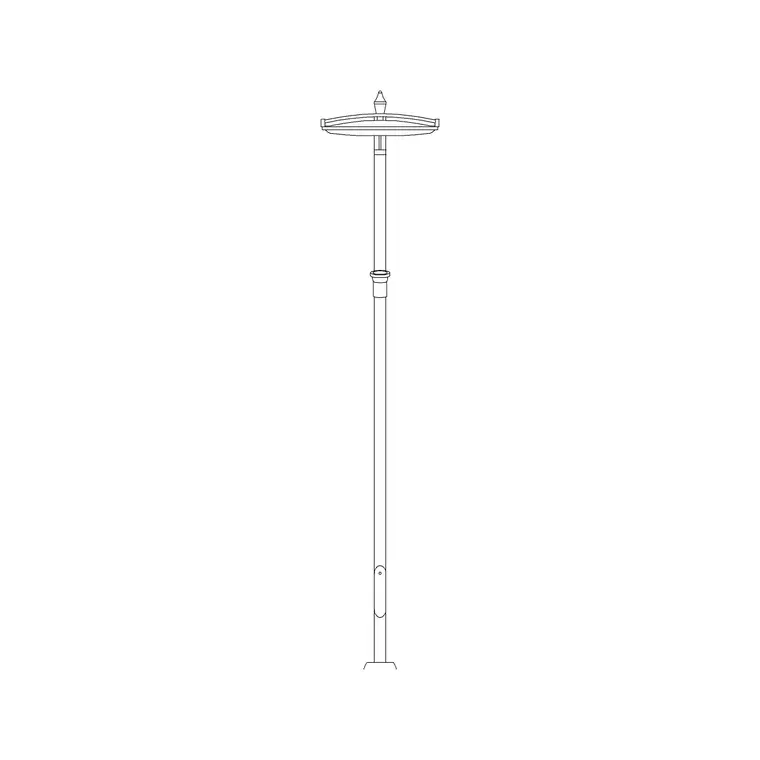
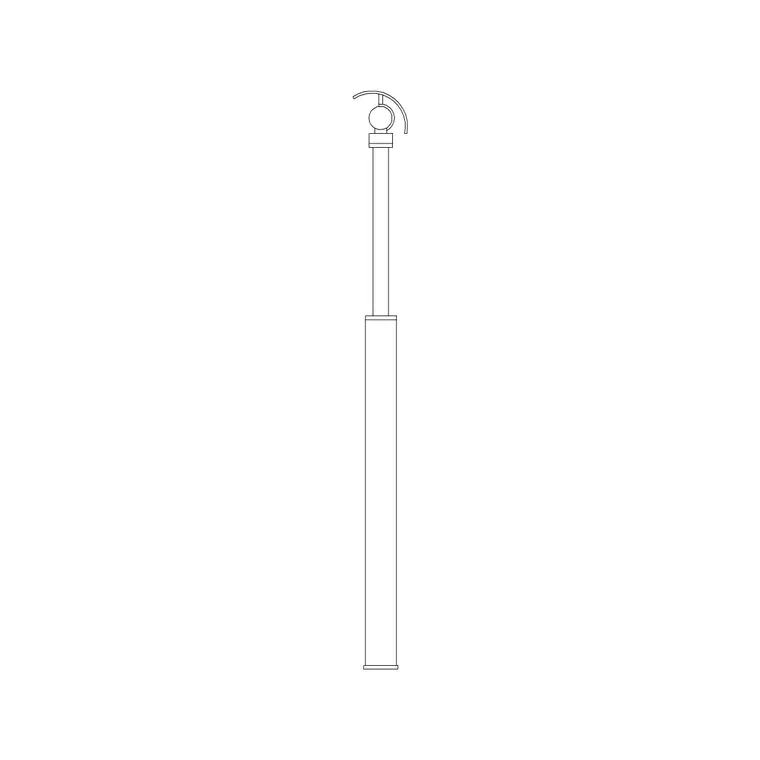
A modern street light is a vertical column — usually tapered steel or aluminium — with a clean, contemporary luminaire head at the top, often a flat LED unit rather than the old lantern shape. In a drawing it is fundamentally a tall, slender element, so its two key dimensions are the mounting height (top of the head above ground) and the small base footprint where the column meets the ground.
The block is a single clean reference: column, head and base as one object you place, rotate to face the road, and array down a run. Because street lights are laid out in regular runs, the block is built to array cleanly along a path so a row of columns down a road or footpath sits at an even, controllable spacing.
Views and what's included
Two views do most of the work. The plan view shows the column base and a small symbol for the head footprint — this is what you array along a road centreline or footpath on a site plan, and tag with a column reference. The elevation (front/side) view shows the full column at its real mounting height with the head on top, which you place in a street section or a streetscape elevation to read the lighting height against the buildings, the carriageway and any trees.
Where both views ship in one DWG, a single download serves the lighting layout and the street section. The elevation is the one to use for any sightline or clearance check — for example, confirming the head clears the swept path of a high vehicle or sits above pedestrian head height.
Typical sizing to design around
Treat these as typical ranges and confirm against the lighting design and local standards, which govern real street-lighting layouts. Modern street-light columns commonly stand around 4–6 m for footpaths, residential streets and car parks, and taller — roughly 8–12 m — for main roads and dual carriageways. Spacing between columns is set by the lighting design (it depends on the lamp output, the mounting height and the required light level), but residential runs often sit in the order of one column every few car-lengths; always take the real spacing from the lighting calculation, not a guess.
Set-back from the kerb and the small concrete base footprint are the other dimensions to draw, because they govern where the column lands relative to the carriageway and any underground services. Because the block is scaled, insert it, dimension the mounting height on the section and the set-back on the plan, and these read directly.
How to insert, set back and array
The block is drawn full size in millimetres (a 6 m column draws as 6000 units); insert at scale 1 in a millimetre drawing, 0.001 in a metre template, or set INSUNITS to millimetres so AutoCAD rescales on insertion. Run INSERT, snap the base to the chosen point, and rotate the head to face the carriageway.
To lay out a run, use the ARRAY command: a path array (ARRAYPATH) along the road centreline or footpath gives evenly-spaced columns following a curve, while a rectangular array suits a car park grid. Offset the run from the kerb line by the design set-back first, then array along that offset line so every column keeps the same set-back. Keep the columns on a dedicated external-lighting layer so they can be frozen for a clean civil drawing and thawed for the lighting layout.
Where modern street lights are used
Modern street-light columns belong on roads and residential streets, car parks and service yards, public plazas and pedestrian squares, park and campus footpaths, and any external masterplan where the lighting layout is part of the scheme. They are a staple of civil, highways, landscape and external-works drawings rather than building plans.
Use the street light alongside the other external blocks — paving, trees, vehicles and people — to build a complete external-works drawing where the lighting, the hard landscape and the planting are coordinated. On a coordinated set the same scaled symbol lets the lighting engineer place the columns to hit the required light levels while the civil engineer keeps each column clear of the underground drainage and service runs.
Layering, spacing and scheduling
Put the columns on a dedicated external-lighting layer with their own colour and lineweight so the lighting layout reads separately from the road geometry and the planting, and can be toggled off for a clean civil drawing. Resist the temptation to eyeball the spacing — set it from the lighting design and array the block along an offset line so every column sits at the correct interval and set-back.
Tag each column with a reference attribute — a code such as SL-01, plus the column height — so the run schedules straight out of the drawing for the contractor and the cost plan. Because columns sit over excavations for their foundations and cabling, having them placed and tagged accurately keeps the lighting layout coordinated with the underground services. Where a run repeats, array rather than copy, so a change of column type updates everywhere through the block definition.
Free download
Browse the full library — DWG & DXF, no signup.
Questions
Frequently asked
How tall is a modern street light column?+
Typically around 4–6 m for footpaths, residential streets and car parks, and roughly 8–12 m for main roads. The block is drawn to scale, so confirm the mounting height against your lighting design and local standards.
How do I space street lights evenly along a curved road?+
Use a path array (ARRAYPATH): offset a line from the kerb by the design set-back, then array the column block along it at the spacing from your lighting calculation. AutoCAD distributes the columns evenly along the curve.
Does the block include both plan and elevation views?+
Where a fitting ships both, the plan view gives the column footprint you array on a site plan and the elevation shows the full column at its mounting height for a street section. They live in the same DWG.
Is the street light CAD block free for commercial use?+
Yes. It downloads free in DWG and DXF with no signup, no watermark and no attribution requirement, and it is cleared for commercial project use.
Related downloads
Blocks for this guide
Popular blocks to download
Related categories
Related guides
Block landing
Free Lighting Fixtures CAD Blocks — DWG Download
Download free lighting fixtures CAD blocks in DWG and DXF — chandeliers, wall lights, downlights and pendants in plan and elevation for AutoCAD.
Block landing
Free Table Lamp CAD Blocks — DWG Download
Download free table lamp CAD blocks in DWG and DXF — classical and decorative table lamps in plan and elevation for AutoCAD 2004+. No signup, commercial-use OK.
Block landing
Free Floor Lamp CAD Blocks — DWG Download
Download free floor lamp CAD blocks in DWG and DXF — straight and arc floor lamps in plan and elevation for AutoCAD 2004+. No signup, free for commercial use.