Curated pack · dental clinic cad blocks
Free dental clinic CAD block pack for AutoCAD
By Sumana Kumar · Published 29 Jan 2025 · Updated 27 Jun 2026
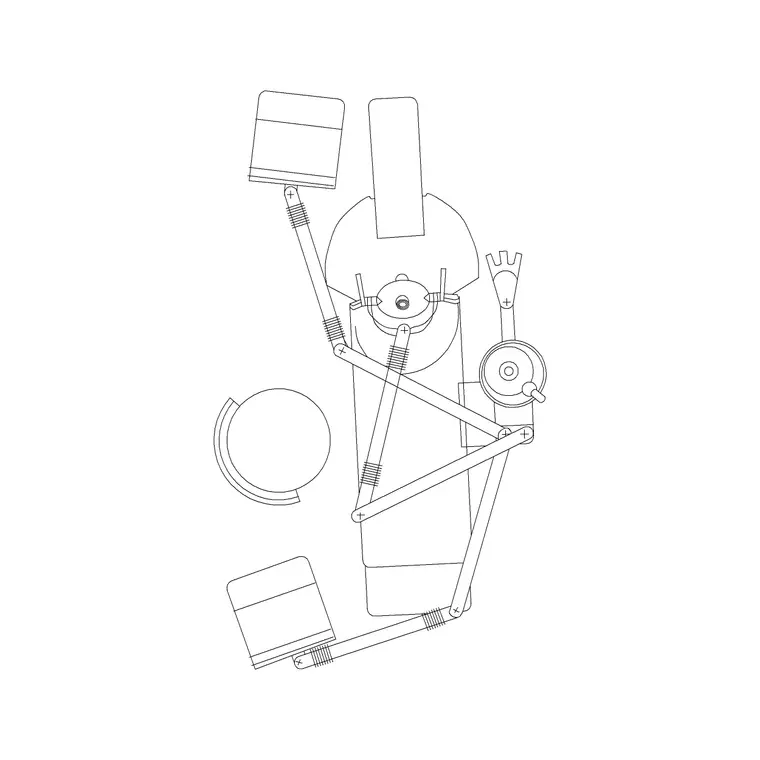
A dental clinic is a set of repeated surgery rooms wrapped around a shared sterilisation and reception core, and the plan has to give each surgery enough clear floor for the dentist, the nurse and the patient chair to all work at once. Setting that out in AutoCAD is quicker when the equipment is already scaled. This free dental clinic CAD block pack gathers the pieces you place most — the dental chair with its delivery unit, the surgery cabinet run, an X-ray unit, the sterilisation bench, plus reception and waiting seating — in DWG, drawn at true dimensions for AutoCAD 2004 or later. Everything is free for personal and commercial work, with no signup and no watermark.
Use the pack to build one surgery room correctly first — chair, cabinet, clinician and nurse positions — then repeat that room down the clinic, because consistency is what makes a multi-chair practice efficient. Because the blocks carry their real footprint, you can confirm the clinician can reach the patient and the cabinet without colliding the moment they land.
A dental clinic also carries clinical duties an ordinary office skips: a dirty-to-clean flow through the sterilisation room, an accessible surgery and WC, and infection-control clearances around the chair. Starting from scaled blocks means those flows and clearances are real distances on the plan, not assumptions tested late on site.
What the dental clinic pack covers
The pack spans the clinical and front-of-house kit. Surgery: the dental chair with its delivery unit and operating light arc, the surgery cabinet run with the clinician's working zone, and a wall-mounted X-ray unit footprint. Decontamination: a sterilisation bench drawn for the dirty-to-clean run. Front of house: a reception desk and waiting-room seating for patients.
Because a clinic repeats its surgery room, the chair-and-cabinet arrangement is built so you can group it and copy the whole surgery down the building, keeping every room identical and every clinician's reach consistent.
Standard dental surgery dimensions to design around
Use these ranges as planning references, not fixed specs. A single dental surgery room generally needs enough clear floor for the chair, the delivery unit, the cabinet and two staff to move — often around 3000–3500 mm in the smaller dimension. The dental chair itself, fully reclined with the patient, extends to roughly 1900–2100 mm long, and the clinician and nurse each need a working position at the head of the chair.
Leave a clear strip of roughly 900 mm around the working sides of the chair for the team to move and the cabinet to open. The sterilisation bench wants a continuous run for the dirty-in, clean-out sequence, often 3000 mm or more of worktop. Drop the scaled blocks in and these clearances read straight off the plan.
Building the dental clinic layout from the blocks
Lay out one surgery room first: place the chair to face the window or wall, set the delivery unit to the clinician's dominant hand, and run the cabinet within easy reach behind. Confirm the nurse position and the clear strip around the chair, then group the room and repeat it for each surgery so the whole clinic shares one proven arrangement.
Put the sterilisation room central so it serves every surgery on a short, clean route, and set reception to command the entrance and waiting area. Keep chairs, cabinets, X-ray, sterilisation and reception on separate layers so a clinical-services plan and a furnished plan come from the same drawing.
Per-item notes: chair, cabinet and sterilisation bench
The dental chair is the block everything else references, so place it first in each room and let the delivery unit, cabinet and staff positions follow its head end. Note the operating light arc on a separate layer so you can confirm it sweeps the mouth without hitting the cabinet. The surgery cabinet should sit within an arm's reach of the seated clinician — draw the working zone in front of it as clear floor so it never gets blocked.
The sterilisation bench is the one fixture with a process to honour: draw it as a one-way dirty-to-clean run so contaminated and sterilised instruments never cross, and keep the bench on its own layer with the flow direction noted. The X-ray unit reads as a small wall footprint, but place it where its arm reaches the chair head.
Plan view and the clinical flow
Dental clinic planning is a plan-view discipline: you arrange surgery rooms, the sterilisation core and reception seen from above, so every block here is drawn in plan. That is the view that proves each surgery has its clearances, the sterilisation flow runs one way, and the accessible route reaches a surgery and the WC.
Draw the dirty-to-clean direction as an arrow on a setting-out layer and confirm the route never doubles back. If you need a surgery or cabinet elevation for the joinery and services, draw it separately on its own layer; the plan blocks fix the positions that elevation must follow. Working plan-first keeps the clinical flow and clearances honest before any cabinetry is detailed.
Who uses the dental clinic pack
Healthcare architects and clinic fit-out specialists use it to turn a shell into a costed surgery layout quickly and to repeat a consistent room across a multi-chair practice. Interior designers use it to plan the reception and patient experience around the clinical core. Students use it for studio briefs and portfolio boards where licence-clear blocks matter.
Because the blocks are free and unrestricted, the same pack carries from a single-surgery practice to a larger multi-chair clinic. Pair it with the medical and office categories to add the wider clinical furniture, staff desks and reception fixtures that complete the building, and you can lay out the whole clinic from one consistent library.
Free download
Browse the full library — DWG & DXF, no signup.
Questions
Frequently asked
What is in the dental clinic CAD block pack?+
The dental chair with delivery unit and operating light, the surgery cabinet run, an X-ray unit footprint, a sterilisation bench, and reception and waiting seating — all drawn in plan at true scale.
How much floor does a single dental surgery need?+
Generally around 3000–3500 mm in the smaller dimension so the chair, delivery unit, cabinet and two staff all work at once, with roughly 900 mm clear around the working sides of the chair. The blocks let you check this directly.
Are the dental blocks free for commercial use?+
Yes. Every block downloads free in DWG with no signup, no watermark and no attribution requirement, and they are cleared for commercial project use.
What units are the blocks drawn in?+
Millimetres, full size. Insert at scale 1 in a millimetre drawing, or set INSUNITS to millimetres so AutoCAD rescales the block automatically on insertion.
Related downloads
Blocks for this guide

Popular blocks to download
Related categories
Related guides
Curated pack
Free Hospital & Clinic CAD Block Pack — DWG
Free hospital and clinic CAD block pack in DWG and DXF — patient beds, dental chairs, reception and waiting furniture. No signup, commercial-use OK.
Curated pack
Free Pharmacy CAD Block Pack — DWG Download
Free pharmacy CAD block pack in DWG — dispensing counters, dispensary shelving, OTC gondolas, a consultation room and fridge in plan for AutoCAD. No signup.
Curated pack
Free Office CAD Block Pack — DWG & DXF
Free office CAD block pack in DWG and DXF — desks, workstations, conference tables and reception furniture in plan view. No signup, commercial-use OK.