Block landing · curtain cad block
Free curtain CAD blocks in DWG and DXF
By Saumyajit Maity · Published 23 Jun 2026 · Updated 28 Jun 2026
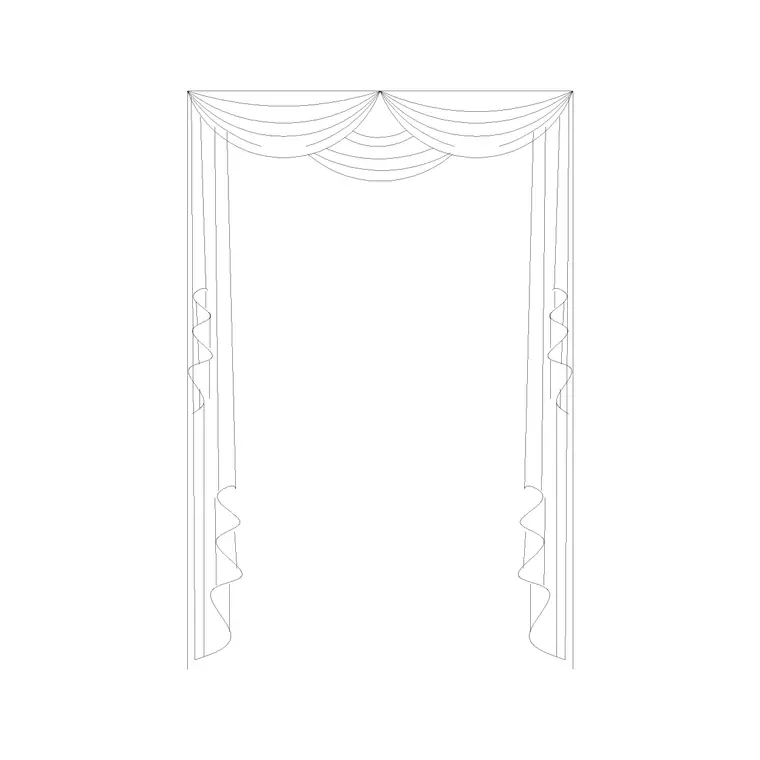
A curtain block is what dresses a window in a drawing, and it changes the whole character of an interior elevation. A bare window reads as a construction opening; the same window with a pair of full-length drapes reads as a finished, comfortable room. This page collects free curtain CAD blocks in DWG and DXF — full-length draped curtains, café curtains, pelmets and valances, and tied-back treatments — drawn in elevation with the soft, gathered folds that make fabric look like fabric, ready for AutoCAD 2004 or later. Everything is free for personal and commercial work, with no signup and no watermark.
Curtains are an almost purely elevational object: the gathered folds and the drape are only legible when you look at the window head-on. In plan, a curtain shows as little more than a wavy line or a short hatch against the glazing line to mark that a treatment exists. Use these blocks to dress windows in residential interior elevations, hotel rooms, restaurants and presentation views, and to give a window wall the vertical softness that hard architecture lacks.
What a curtain block captures
A good curtain CAD block is really a study in folds. The block carries the vertical gathered lines of the fabric, the heading at the top (a pencil-pleat, eyelet or pinch-pleat top), and the hem at the bottom, often with a slight pooling where a full-length curtain meets the floor. Tied-back versions add the swept curve where the fabric is drawn to one side and held by a tieback, revealing the window behind.
The better blocks separate the curtain from any pelmet or valance (the decorative top that hides the track) onto different sub-layers, so you can show a curtain with or without its pelmet. Because the whole appeal of a curtain is its soft, irregular folds, these blocks use more line-work than a typical hard-edged accessory — the irregularity is deliberate, and it is what stops the drape looking like a folded screen.
Elevation is the view that matters
Curtains live in elevation. When you draw a room face-on, the curtain block sits over the window opening, framing the glazing and softening the wall. This is where the folds, the heading and the hem all read, and where a tied-back treatment shows the window behind the swept fabric. For interior elevations, sections through a room and presentation views, the elevation curtain is the block you want.
In plan, a curtain is barely a graphic — usually a wavy line or a thin hatched band against the inside face of the glazing, marking that the window is curtained without trying to draw the drape from above. If your plan needs to show the curtain stack-back (how far the gathered fabric projects into the room when open), draw that as a short rectangle at each end of the window rather than expecting the elevation block to convey it.
Typical curtain dimensions to design around
Curtains are sized to the window and the wall, so a few figures help. Full-length curtains usually run from a track set 150–300 mm above the window head down to just above, or pooling onto, the floor — so a curtain in a room with a 2400 mm ceiling might be 2200–2400 mm tall. Café and sill-length curtains stop at the window sill, often 900–1100 mm above the floor.
Width matters because curtains gather: a curtain needs roughly 1.5 to 2.5 times the track width in fabric to hang with proper fullness, and when open it stacks back 150–300 mm or more beyond each side of the window. The pelmet or valance, if present, typically adds 150–400 mm of height above the track. Because the blocks are drawn full size, scaling a curtain to your actual window height and snapping the hem to the floor line keeps the drape believable rather than stretched or squashed.
How to insert and place the block
These curtain blocks are drawn full size in millimetres. Insert at scale 1 in a millimetre drawing, 0.001 in a metre drawing, or set INSUNITS to millimetres so AutoCAD rescales automatically. Use INSERT or drag the DWG from a tool palette, and pick a sensible insertion point — the top centre of the curtain heading works well so you can snap it to the track line above the window.
Scale the curtain vertically to match your window-to-floor height, keeping the heading at the track and letting the hem fall to (or just onto) the floor. For a pair of curtains, insert one, then MIRROR it about the window centreline to get a matched pair that frames the opening. If your block is a single drape, you can stretch its width with STRETCH to suit a wider window, though watch that the folds do not smear — sometimes it reads better to keep the fold density and accept a slightly different fullness.
Where curtain blocks are used
Curtains dress windows across residential and hospitality interiors: living rooms, bedrooms, dining rooms, studies, hotel guest rooms and suites, restaurants and function rooms, and any presentation elevation where a window wall needs softening. They also appear in theatre, stage and event drawings where heavy drapes are part of the design rather than just a window treatment.
Pair curtain blocks with the window blocks (so the treatment sits correctly over the real opening), and with sofa, bed and furniture elevations to build a complete, lived-in room. Add picture-frame, wall-art and vase blocks from the accessories category and a single elevation can communicate an entire scheme. Because every block is free and licence-clear, the same curtain carries from a quick concept elevation through to the issued interior drawing set.
Layering and presentation tips
Keep curtains on a dedicated soft-furnishings or decoration layer, separate from the window and wall layers. The window opening is part of the building and must be coordinated and dimensioned; the curtain is a soft furnishing that may change between revisions or be priced separately. Splitting them lets you produce a clean technical elevation by freezing the curtains and a dressed presentation elevation by thawing them, from one drawing.
A few presentation habits help curtains read well. Show full-length drapes pooling very slightly at the floor rather than hovering above it — a tiny pool reads as luxurious, a gap reads as a mistake. Use tied-back blocks when you want to reveal the view or the glazing behind, and closed drapes when you want privacy or a softer, fuller wall of fabric. And because the pelmet usually sits on its own sub-layer, you can offer the client a version with a tailored pelmet and a version with an exposed track, letting the elevation carry both options without redrawing the curtain.
Free download
Browse the full library — DWG & DXF, no signup.
Questions
Frequently asked
Are curtain blocks drawn in plan or elevation?+
Elevation. The gathered folds, heading and hem of a curtain only read when the window is seen head-on. In plan a curtain shows as little more than a wavy line or thin hatch against the glazing to mark the treatment.
How tall should a curtain block be?+
Full-length curtains run from a track set 150–300 mm above the window head down to just above or pooling onto the floor. Café curtains stop at the sill, often 900–1100 mm above the floor. Scale the block to your actual window height.
How do I make a matched pair of curtains?+
Insert one curtain, then use MIRROR about the window centreline to produce a matched pair framing the opening. For a single drape across a wide window, stretch the width while watching that the fold density still reads.
Are the curtain CAD blocks free for commercial use?+
Yes. Every curtain block downloads free in DWG and DXF with no signup, no watermark and no attribution requirement, and they are cleared for commercial project use.
Related downloads
Blocks for this guide

Related categories
Related guides
Block landing
Free Picture Frame CAD Blocks — DWG Download
Download free picture frame CAD blocks in DWG and DXF — framed photos drawn in elevation for AutoCAD interior drawings. No signup, commercial use OK.
Block landing
Free Wall Art & Painting CAD Blocks — DWG
Download free wall art and painting CAD blocks in DWG and DXF — abstract art and canvases for AutoCAD interior elevations. No signup, commercial OK.
Block landing
Free Decorative Vase CAD Blocks — DWG Download
Download free decorative vase CAD blocks in DWG and DXF — designer vases and vases with flowers in plan and elevation for AutoCAD. No signup, commercial OK.