Block landing · ceiling fan cad block
Free ceiling fan with light CAD blocks in DWG and DXF
By Saumyajit Maity · Published 16 Mar 2022 · Updated 2 Jun 2026
A ceiling fan with a light combines two services in one fitting — air movement and general lighting — which makes it a slightly special block: it lives on both the reflected ceiling plan and, because of its swept diameter, the mechanical and clearance picture too. This page collects free ceiling fan with light CAD blocks in DWG and DXF: suspended fans with integrated light kits, drawn at true millimetre dimensions with the blade sweep shown, for AutoCAD 2004 or later. Everything is free for personal and commercial work, with no signup and no watermark.
A ceiling fan is common in warm-climate residential and commercial work, and it asks two questions of a layout that a plain light does not: is there enough ceiling height for the fan to hang safely below the slab, and is the swept blade circle clear of walls, beams and other fittings? Use these blocks to detail bedrooms, living rooms, verandas, restaurants and offices, and to check both the light position and the blade clearance from the same drawing.
Why a ceiling fan block is different
A ceiling fan with light is more than a lighting symbol because it sweeps a circle as the blades rotate, and that swept diameter is a clearance the layout has to respect. The plan block shows the blade circle at its true diameter — sometimes with the blades drawn, sometimes as a dashed sweep — so you can keep it clear of walls, beams, wardrobes and other ceiling fittings. The light kit sits at the hub, marking the general-lighting contribution.
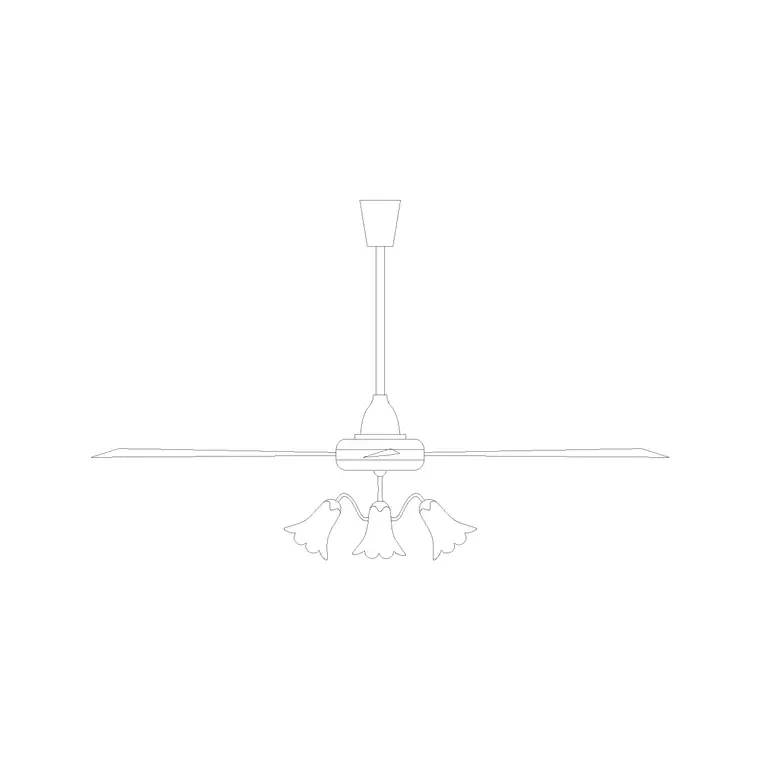
The elevation matters too, which is unusual for a ceiling fitting. A fan needs a minimum hang so the blades clear heads, and a minimum gap to the ceiling so it draws air, so the drop on the down-rod is a real dimension. The block is drawn so you can set the blade height in section and confirm the room is tall enough.
Views and what's included
Ceiling fan downloads here pair a plan view (the blade sweep and central light) with an elevation showing the down-rod, motor housing, blades and light kit. The plan is what you place on the reflected ceiling plan and check for blade clearance; the elevation is what you use to confirm hang height in a section.
Where both views sit in one DWG, insert the one your drawing needs and freeze the rest. The blade circle, the motor and the light kit are separate elements so you can show the sweep as a clearance zone on a coordination plan while keeping the detailed blades for presentation.
Typical ceiling fan dimensions and clearances
Use these ranges as you place a fan. Blade sweep (overall diameter): commonly 1200–1400 mm for a standard domestic fan, with smaller fans around 900–1100 mm and large-span fans up to 1500 mm or more. Down-rod drop: variable, from a short flush mount to several hundred millimetres in a tall room.
The clearances are the point of the block. Keep the blade tips clear of the nearest wall by a sensible margin so the airflow is not choked and the blades cannot strike anything. Maintain a minimum height from the floor to the blades for head clearance — commonly around 2100–2300 mm as a working minimum — which is why a fan needs more ceiling height than a flush light. Drawing the swept circle in plan and the hang in section lets you confirm both clearances at once.
How to insert and place the block
These ceiling fan blocks are drawn full size in millimetres. Insert at scale 1 in a millimetre drawing, 0.001 in a metre drawing, or set INSUNITS to millimetres so AutoCAD rescales on insertion.
Run INSERT or drag the DWG from a tool palette, snap the plan block's centre to the intended fan position — usually the centre of the room or the bed — and check the swept circle against the walls and any beams. In elevation, set the down-rod so the blades sit at the chosen height. Because the fan is a single block reference, you can copy it to repeated rooms and adjust the down-rod once in the definition for a whole apartment.
Where ceiling fan blocks are used
Ceiling fans with lights are common in warm-climate residential work — bedrooms, living rooms, verandas and covered terraces — and in commercial and hospitality spaces such as restaurants, cafés, offices and community halls where moving air improves comfort without full air-conditioning. On the reflected ceiling plan they double as a general-lighting position and a mechanical item, so they often need coordinating with both the lighting and the ventilation strategy.
Pair the ceiling fan blocks with ceiling light, pendant and wall light blocks to build a complete lighting and comfort layer, and centre them over beds and seating using the furniture blocks as a guide. As licence-clear blocks they suit residential and commercial drawing sets and student schemes.
Coordinating the fan with the room and the ceiling
A ceiling fan asks for coordination that a plain light does not, and the block is what makes that coordination quick. First, the swept circle has to be clear: place the scaled blade sweep in plan and you can immediately see whether it clips a wardrobe door swing, a beam, a curtain track or a neighbouring pendant. A fan that looks centred can still foul a fitted wardrobe at the room edge, and the dashed sweep catches that before it reaches site.
Second, the hang height has to work with the ceiling height. In a room with a low ceiling, a fan may need a flush mount to keep the blades above head height, while a taller room can take a down-rod that brings the fan into the occupied zone for better airflow. Drawing the fan at its true drop in a section confirms the room is tall enough and keeps the blade height above the head-clearance minimum. Keeping the fans on the lighting layer, with the swept circle on a coordination layer, lets you produce both a clean ceiling plan and a clearance overlay from the same drawing.
Free download
Browse the full library — DWG & DXF, no signup.
Questions
Frequently asked
Why does the ceiling fan block show a circle?+
That circle is the blade sweep — the diameter the blades trace as they rotate. It is a clearance zone, so keeping it clear of walls, beams and other fittings is part of placing the fan correctly. The scaled block lets you check it in plan.
How much ceiling height does a ceiling fan need?+
Enough to keep the blades above head height with a gap to the ceiling for airflow — commonly a floor-to-blade minimum in the order of 2100–2300 mm. Drawing the fan at its true hang in a section confirms the room is tall enough.
Do the ceiling fan blocks include plan and elevation views?+
Yes, many do. The plan shows the blade sweep and central light for the reflected ceiling plan, and the elevation shows the down-rod and blades so you can set the hang height. Where both are in one DWG, insert the one you need and freeze the other.
Are the ceiling fan blocks free for commercial use?+
Yes. Every block downloads free in DWG and, where available, DXF, with no signup, no watermark and no attribution requirement, and they are cleared for commercial project use.
Related downloads
Blocks for this guide
Popular blocks to download
Related categories
Related guides
Block landing
Free Lighting Fixtures CAD Blocks — DWG Download
Download free lighting fixtures CAD blocks in DWG and DXF — chandeliers, wall lights, downlights and pendants in plan and elevation for AutoCAD.
Block landing
Free Table Lamp CAD Blocks — DWG Download
Download free table lamp CAD blocks in DWG and DXF — classical and decorative table lamps in plan and elevation for AutoCAD 2004+. No signup, commercial-use OK.
Block landing
Free Floor Lamp CAD Blocks — DWG Download
Download free floor lamp CAD blocks in DWG and DXF — straight and arc floor lamps in plan and elevation for AutoCAD 2004+. No signup, free for commercial use.