Block landing · foosball table cad block dwg
Free foosball table CAD block in DWG
By Sumana Kumar · Published 24 Jun 2024 · Updated 19 Apr 2026
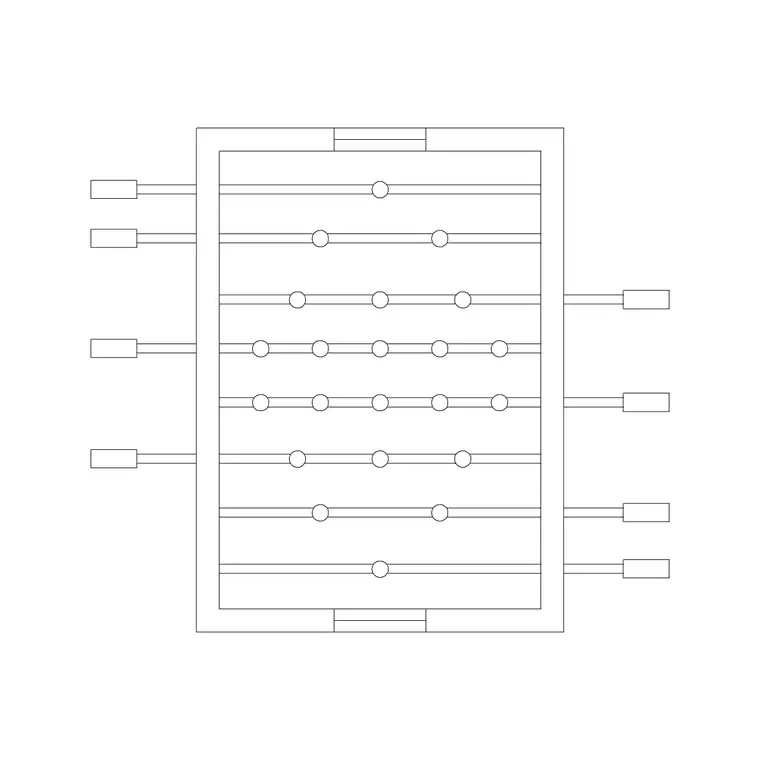
A foosball table is the kind of block that turns a flat break-room plan into a space people actually want to use. This page offers a free foosball table CAD block in DWG, drawn at true millimetre size so you can place it in a games room, an office break-out zone or a hotel leisure area and instantly see how much floor the table claims once you account for the players standing at each end and the telescopic handles. It is free for personal and commercial work, with no signup, no watermark and no attribution.
The value of a foosball block is in the clearance, not just the cabinet. A table that fits on paper but leaves no room for four players to stand and rotate the rods is a layout that fails in use. Drawing the table to scale lets you reserve that activity zone honestly against doors, seating and circulation.
What the foosball block represents
A foosball, or table-football, table is a waist-height cabinet on four legs with player rods running across the short axis and handles projecting from both long sides. The plan block shows the cabinet outline and, importantly, the swept zone of the handles, because a sliding rod extends well beyond the cabinet face and is the real edge a passer-by has to clear.
A well-drawn block keeps the cabinet, the rods and the handle-sweep on separate layers so you can show a tight cabinet outline for a furniture schedule or the full play envelope when you are checking circulation. Because it is a single block reference, you can place it once and copy it for a multi-table games room.
Views and what is included
For a leisure or break-out layout you work almost entirely in plan, and the plan footprint is what this block is built for. It shows the table from above with the handle reach indicated, which is exactly what you array or place against a wall. Where a download includes a side or elevation view, it is useful for a presentation elevation of a games room, showing the table height against seating and shelving.
Keep the table on its own furniture layer so you can toggle it off to show a clean room and on to show the furnished leisure scheme, both from the same drawing.
Typical sizing to design around
Use these as planning ranges. A standard foosball cabinet is roughly 1400–1500 mm long and 700–760 mm wide, with the play surface a little smaller. Cabinet top height sits around 850–950 mm. The telescopic handles add reach on each long side, so the table's working width can grow to 1100–1300 mm once the rods are pulled out.
The figure that governs the layout is the player zone. Allow roughly 700–900 mm of standing space at each end and along each side so four players can stand and operate the rods without colliding, and keep that zone clear of doors and walkways. With the scaled block in place, those activity clearances become a visual check.
How to insert and place the block
The block is full size in millimetres. Insert at scale 1 in a millimetre drawing, 0.001 in a metre drawing, or set INSUNITS to millimetres so AutoCAD rescales automatically on insertion. Run INSERT (or drag from a tool palette), pick the centre of the cabinet as the insertion point, then rotate the table to suit the room — usually with the long axis giving the most generous standing space.
Move the table onto a furniture or leisure-equipment layer, and use the indicated handle-sweep to confirm the activity zone clears seating and circulation. For a multi-table room, COPY at the spacing that keeps player zones from overlapping, so two games can run side by side without players backing into each other.
Where the foosball block is used
Foosball table blocks appear in office break-out and recreation rooms, co-working social spaces, hotel and resort games rooms, student common rooms, youth and community centres, and residential basements. They pair well with pool-table, table-tennis and seating blocks to build a complete leisure layer, and with the wider fitness and sports library for recreation-focused schemes.
Because the file is free and licence-clear, it suits concept boards and quick space-tests where a designer wants to show that a break-out area is genuinely usable. The same block carries from an early concept plan through to a coordinated furniture drawing without being redrawn, so the table you place at the feasibility stage is the same one that ends up on the issued layout.
Planning a usable games corner
A games room reads best when each activity has its own reserved zone with circulation flowing around, not through, the play space. Put the foosball, pool and table-tennis tables on a leisure-equipment layer with their activity envelopes shown, then route the walkways in the gaps. Freezing that layer gives you a clean architectural plan; thawing it gives the furnished leisure scheme.
If you tag each table with a type attribute, you can extract a leisure-furniture schedule directly from the drawing. When the corner is settled, WBLOCK a table-plus-clearance unit so you can reuse a tested, properly spaced games station in the next break-out room you lay out.
Free download
Browse the full library — DWG & DXF, no signup.
Questions
Frequently asked
Is the foosball table CAD block free for commercial projects?+
Yes. It downloads free in DWG with no signup, no watermark and no attribution, and it is cleared for commercial leisure and break-out area drawings.
Does the block show the handle clearance?+
Where indicated, the plan shows the swept zone of the telescopic handles, because the rods extend beyond the cabinet and define the real edge a passer-by must clear.
What scale is the foosball table drawn at?+
It is drawn full size in millimetres. Insert at scale 1 in a millimetre drawing, 0.001 in a metre drawing, or set INSUNITS to millimetres so AutoCAD rescales automatically.
How much space should I leave around a foosball table?+
As a planning rule, allow roughly 700–900 mm of standing space at each end and side so four players can operate the rods, and keep that zone clear of doors and walkways.
Related downloads
Blocks for this guide
Related categories
Related guides
Block landing
Free Gym Equipment CAD Blocks — DWG Download
Download free gym equipment CAD blocks in DWG and DXF — treadmills, weight machines, racks and benches in plan and elevation, AutoCAD 2004+, no signup.
Block landing
Free Treadmill CAD Block — DWG & DXF Download
Download a free treadmill CAD block in DWG and DXF — drawn in plan and elevation with the run-off zone, true to size for AutoCAD gym layouts. No signup.
Block landing
Free Exercise Bike CAD Block — DWG Download
Download a free exercise bike CAD block in DWG and DXF — upright, spin and recumbent bikes in plan and elevation, true to size for gym layouts. No signup.