Block landing · floor lamp elevation cad block
Free floor lamp elevation CAD block in DWG and DXF
By Sumana Kumar · Published 11 Mar 2023 · Updated 9 Feb 2026
A floor lamp is a freestanding luminaire that reads as a tall vertical element in any room, which is why the elevation is the view designers reach for first. This page gives you a free floor lamp elevation CAD block in DWG and DXF, drawn at true millimetre height so it sits correctly against furniture and ceiling lines the moment it lands on an interior elevation. It is free for personal and commercial work, with no signup, no watermark and no attribution.
Floor lamps soften the corner of a living room, flank a sofa, light a reading chair or anchor a hotel lobby seating cluster. In elevation they give a room scale and a sense of how the lighting layers from the floor up. The block here keeps the base, stem and shade in clean, correctly proportioned geometry so the lamp looks right next to a seated figure or a side table.
Reading the lamp in elevation
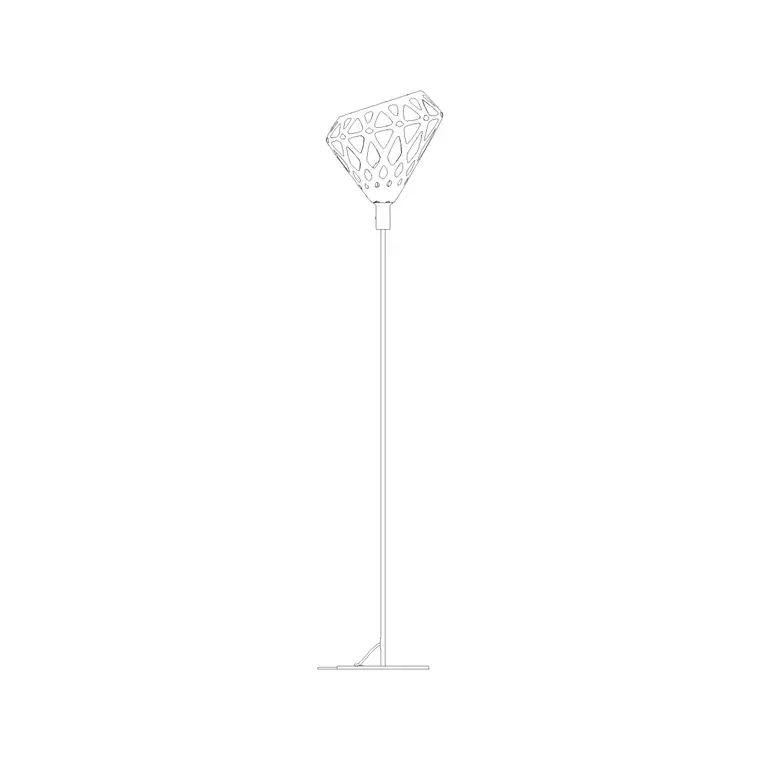
The elevation shows the floor lamp face-on: the base footprint at the floor, the slender stem rising through the room, and the shade or head at the top. Because a floor lamp is tall and narrow, the two numbers that govern how it sits in a drawing are its overall height and its base diameter — the height tells you whether the shade clears a side table or sits below a picture rail, the base diameter tells you the floor space it claims next to the furniture.
The block is drawn as line geometry on tidy layers, so the base, stem and shade can be recoloured or frozen independently. It prints cleanly at interior elevation scales such as 1:50 and 1:25, and explodes neatly if you need to edit the shade profile for a specific fitting.
Typical floor lamp dimensions to design around
Reach for these ranges and confirm against the actual product. Overall height for a standard floor lamp usually falls in the 1500–1800 mm band, with arc and reading lamps reaching higher. Shade diameter commonly runs 250–500 mm, and the base diameter sits around 250–350 mm for a weighted disc base. A slim tripod or stem base may have a wider footprint at floor level even when the visible stem is thin.
These figures let you check that the lamp clears the back of a sofa, sits sensibly beside a 400–500 mm high coffee or side table, and leaves a comfortable circulation gap. Because the block is full size, you dimension straight off it rather than estimating.
How to scale, insert and place the lamp
The DWG is drawn in millimetres. Insert at scale 1 in a millimetre drawing, 0.001 in a metre drawing, or set INSUNITS to millimetres so an imperial template rescales the block on insertion. Run INSERT or drag the file from a tool palette and pick the insertion point at the centre of the base so the lamp stands on the floor line.
Snap the base to the finished floor line of your elevation, then slide the lamp horizontally to sit beside the chair, sofa or table it serves. Keep it on its own layer so you can show or hide the freestanding lighting independently of the fixed fittings. For a paired arrangement either side of a seating group, MIRROR a copy to keep the two lamps symmetrical.
Where floor lamp elevations are used
Residential living rooms, bedrooms and studies are the classic home for a floor lamp elevation, but they appear just as often in hospitality and commercial work: hotel lobbies and guest rooms, lounge and breakout areas, reception waiting zones and showroom vignettes. In each case the lamp in elevation communicates the layered lighting scheme to the client far more readily than a plan dot.
The same block drops into a furniture and finishes presentation, a section through a double-height lounge, or a mood-board style elevation. Because it is free and licence-clear it suits student portfolios and competition boards as readily as a coordinated interiors package.
Building a complete lighting layer
A floor lamp rarely lights a room on its own, so it pays to draw it alongside the rest of the scheme. Pair this block with the wall lamp, ceiling lamp and pendant blocks in the lighting category to show how the light builds from floor, wall and ceiling together — that layered read is what sells an interior elevation.
Keep all of it on a dedicated lighting layer with its own colour, so you can issue a clean furniture elevation by freezing the lighting and a full scheme by thawing it. If you attribute each lamp with a type code, the elevation doubles as a count you can pull into a lighting schedule when the design is locked.
Showing the lamp's power route in the layout
A floor lamp plugs in, which sounds trivial until you place one in the middle of a room with no socket nearby. Because the lamp is freestanding, its position has to relate to a floor or wall socket within reach of its flex, and a layout that shows the lamp without showing where it draws power leaves a gap the electrician or the client will spot. Placing the full-size block beside the seating it serves lets you check that a socket is genuinely within a sensible flex run rather than trailing a cable across a walkway.
In open-plan rooms this often drives a floor socket or a socket in the skirting behind a sofa, positioned precisely so the lamp's flex is hidden. Drawing the lamp to scale, on its own layer, lets you coordinate that socket position with the furniture plan and flag any lamp that would otherwise need an awkward extension lead. It is a small coordination move, but it is the difference between a lighting layout that can actually be built and one that looks right only on paper.
Free download
Browse the full library — DWG & DXF, no signup.
Questions
Frequently asked
Is the floor lamp elevation block free to use commercially?+
Yes. It downloads free in DWG and, where available, DXF, with no signup, no watermark and no attribution required, and it is cleared for commercial project work.
How tall should I draw a floor lamp?+
A standard floor lamp usually falls in the 1500–1800 mm overall height range, with arc and reading types reaching higher. The block is full size, so dimension your exact height off it once you have chosen the product.
Does the file include a plan view as well?+
This is an elevation block. For the plan footprint of a floor lamp, use the matching plan symbol from the lighting category. Many interior packages only need the elevation, since a floor lamp is a vertical feature.
Will it open in older AutoCAD and free viewers?+
Yes. It targets AutoCAD 2004 and later, opening in current AutoCAD, AutoCAD LT, BricsCAD, DraftSight and free DWG viewers such as Autodesk's online viewer.
Related downloads
Blocks for this guide
Popular blocks to download
Related categories
Related guides
Block landing
Free Lighting Fixtures CAD Blocks — DWG Download
Download free lighting fixtures CAD blocks in DWG and DXF — chandeliers, wall lights, downlights and pendants in plan and elevation for AutoCAD.
Block landing
Free Table Lamp CAD Blocks — DWG Download
Download free table lamp CAD blocks in DWG and DXF — classical and decorative table lamps in plan and elevation for AutoCAD 2004+. No signup, commercial-use OK.
Block landing
Free Floor Lamp CAD Blocks — DWG Download
Download free floor lamp CAD blocks in DWG and DXF — straight and arc floor lamps in plan and elevation for AutoCAD 2004+. No signup, free for commercial use.