Block landing · cyclocross bicycle cad block dwg
Free cyclocross bicycle CAD block in DWG and DXF
By Saumyajit Maity · Published 12 Sep 2022 · Updated 22 Apr 2026
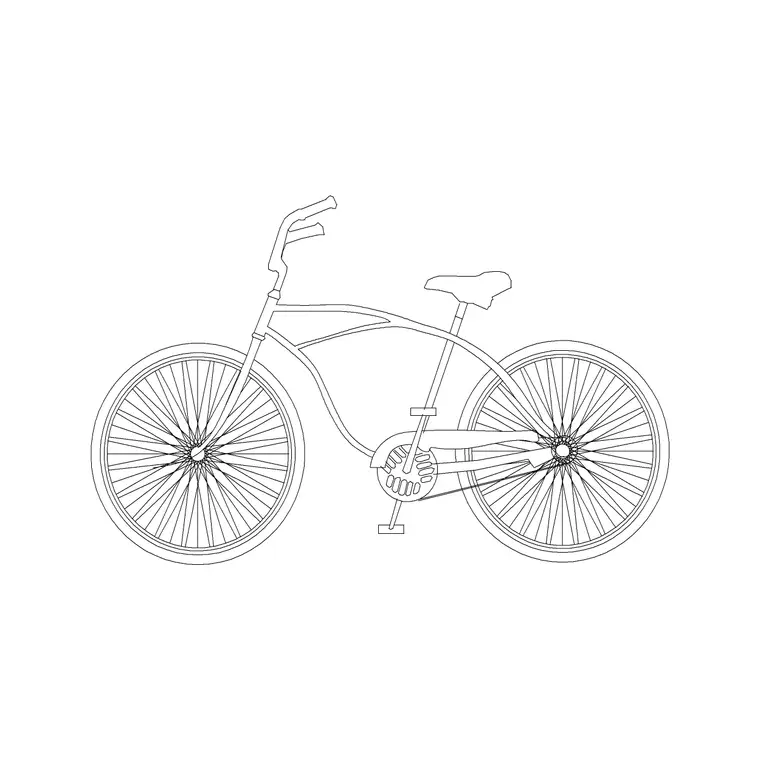
A cyclocross bicycle CAD block is a drop-bar, lightweight bike built for mixed road-and-trail riding — the kind of frame you sketch into cycle stores, bike-parking studies and sustainable-transport plans. It is the pedal-powered counterpart to the motorcycle blocks, and an essential ingredient when a scheme needs to show cycling provision. This page offers a free cyclocross bicycle block in DWG and DXF, drawn in side elevation at true scale for AutoCAD 2004 or later, free for personal and commercial use with no signup or watermark.
Use the bicycle in cycle-store and stand layouts, bike-shed and parking studies, sports facility drawings and lifestyle frontages. Drawn to scale, it sizes a bike against a Sheffield stand, a rack pitch or a doorway, and it gives a transport drawing the cycling detail that planners increasingly look for.
What the cyclocross bicycle block is
This block is a side-elevation profile of a cyclocross or road-style bicycle — a diamond frame with dropped handlebars, two equal wheels, the chainset and the saddle. It is clean line geometry, so it prints sharply and stays light, and the slim silhouette reads clearly as a performance bicycle rather than a heavy machine.
The defining cues are the lightweight diamond frame, the drop bars and the relatively large, narrow wheels of a road or cyclocross bike. Those features distinguish it from a motorcycle at a glance and give a transport or store drawing the right level of cycling detail without clutter.
View and what's included
The download is a side elevation — the bicycle seen square-on. It suits cycle-store and showroom layouts, bike-parking and shed studies, sports and recreation facility drawings, and lifestyle frontages where the bike sits beside stands, doors and figures at a shared scale.
The geometry is layered so you can recolour the frame, mute the spokes or thin the chainset detail independently. Keep it as a single block reference so it copies, mirrors and rotates as one object — exactly what you want when arraying a rank of bikes along a Sheffield-stand row.
Typical sizing to design around
Use the block as a scale check rather than a spec sheet. An adult cyclocross or road bicycle generally sits around 1.7–1.9 m long, with a wheel diameter near 0.68–0.7 m and a handlebar height to roughly 1.0–1.1 m. Those dimensions govern how the bike fits a rack or a parking pitch.
Cycle stands are commonly pitched around 1.0 m apart, with the bikes leaning either side, so a scaled bicycle shows immediately how many fit a stand row and how much aisle they leave. Real bikes vary by size and type, so scale to the envelope your layout needs rather than to one fixed length.
How to insert the block
The DWG is full size in millimetres. In a millimetre drawing, insert at scale 1 for real size; in a metre drawing, insert at 0.001. On an imperial template, set INSUNITS to millimetres so AutoCAD rescales on insertion, or insert at 0.03937 to convert to inches.
Snap the insertion point to a wheel contact point or another consistent datum, mirror to flip the facing, and array along a stand row. As a block reference, a BEDIT change to the definition updates every bike at once — handy when you simplify the spokes for a small-scale plan.
Where cyclocross bicycle blocks are used
The bicycle block belongs in cycle-store and bike-shop layouts, bike-parking and shed studies, sports and recreation facility drawings, school and campus transport plans, and sustainable-mobility presentation boards. As planning increasingly rewards cycling provision, a scaled bike is a routine ingredient in transport and access drawings.
Architects use it to populate bike stores and entrances; transport planners use it to size stand rows and sheds; students use it on portfolio boards because it is licence-clear. Combine it with the motorcycle blocks from the vehicles category so a transport study shows the full two-wheeler range from pushbike to heavy bike.
Drawing convincing cycle parking provision
Cycle parking is judged on more than a count of stands — reviewers look at whether bikes can actually be wheeled in, locked and removed without a tangle. A scaled bicycle block lets you test that. Lean a bike against each side of a Sheffield stand at the right pitch and the drawing shows immediately whether the handlebars of neighbouring bikes clash or whether the aisle behind leaves room to manoeuvre.
For covered stores and sheds, the same block helps you check headroom and door width: a bike held at the handlebars needs a certain clear height and a clear opening to pass. Adding one or two figures wheeling a bike turns a dry rack layout into a drawing that demonstrates the provision works in use, which is exactly what a planning or access reviewer wants to see.
Free download
Browse the full library — DWG & DXF, no signup.
Questions
Frequently asked
Is the cyclocross bicycle CAD block free for commercial use?+
Yes. It downloads free in DWG and, where available, DXF, with no signup, no watermark and no attribution requirement, and it is cleared for commercial projects.
Can I use the bicycle block to size cycle parking?+
Yes. Drawn to scale, the bike shows how machines fit a stand row. With stands often pitched around 1.0 m apart, a scaled bicycle reveals capacity and aisle width at a glance.
What view does the bicycle block come in?+
Side elevation — the bike seen square-on — which suits store layouts, stand rows and elevations. For a bike shed or rack plan you may prefer a plan-view block to size racks from above.
Will the file open in older AutoCAD or a free viewer?+
Yes. The DWG targets AutoCAD 2004 and later and opens in AutoCAD, AutoCAD LT, BricsCAD, DraftSight and free DWG viewers.
Related downloads
Blocks for this guide
Related categories
Related guides
Block landing
Free Car Plan View CAD Block — DWG Download
Download a free car plan-view CAD block in DWG and DXF — the top-down footprint for parking layouts and site plans. AutoCAD 2004+, no signup.
Block landing
Free Car Elevation CAD Block — DWG Download
Download a free car elevation CAD block in DWG and DXF — side and front views for streetscapes, showrooms and presentations. AutoCAD 2004+, no signup.
Block landing
Free Sedan Car CAD Blocks — DWG Download
Download free sedan car CAD blocks in DWG and DXF — saloon and luxury sedans in plan and elevation for parking and showrooms. AutoCAD 2004+, no signup.