Block landing · ceramic potted plant cad block
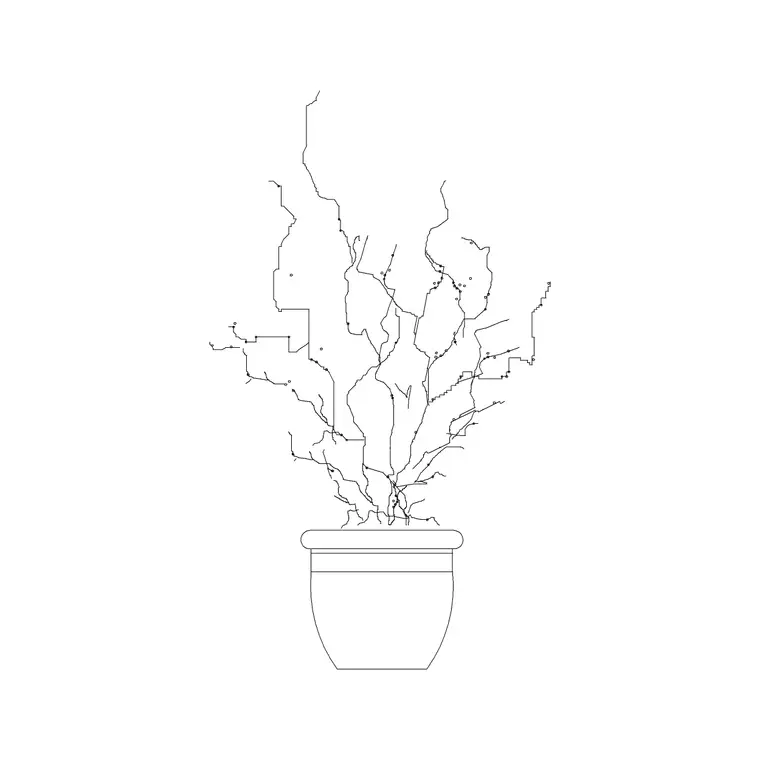
Ceramic potted plant CAD block in DWG
By Saumyajit Maity · Published 15 Nov 2024 · Updated 8 Apr 2026
A ceramic pot reads differently from a plain plastic or terracotta container: the rounded, glazed profile signals a considered, finished interior, and it is the pot designers choose when the planter itself is part of the styling rather than just a vessel. This free ceramic potted plant CAD block captures that refined container in DWG, drawn in elevation for AutoCAD 2004 or later. It is free for personal and commercial use, with no signup, no watermark and no attribution.
Where a utilitarian pot is all about the plant, a ceramic pot is about the pairing of pot and plant together. The elevation gives the container a smooth, often bellied or curved profile that suggests a glazed finish, so the block carries a more decorative, retail-and-residential feel. It is the planter to reach for when the interior is styled to a high standard and the pot deserves to be drawn as carefully as the furniture.
What the ceramic pot block represents
The block draws a foliage plant in a smooth, rounded ceramic container — typically a curved or bellied profile with a defined rim that reads as a glazed, thrown pot rather than a straight-sided utility planter. The pot is given a clean, continuous outline so it can carry a solid fill or a subtle hatch to suggest a glazed surface.
The foliage above is a simplified silhouette sized to suit the pot, because a ceramic planter is usually shown with a tidy, contained plant rather than a sprawling one. The container and the plant sit on separable linework, so you can give the ceramic a colour or fill that matches a material board while keeping the foliage in a neutral green line.
Views and what's included
This is an elevation block: the ceramic pot and its plant seen face-on, ready for interior elevations, sections and styled presentation drawings. The shaped ceramic profile is exactly the kind of detail that reads in elevation and is lost in a top-down plan.
The geometry keeps the pot and foliage separable so you can treat the ceramic as a finished material — fill it, hatch it, or recolour it to match a glaze on your board — without disturbing the planting. It inserts as a single block reference for easy placing and copying, and explodes cleanly if you want to refine the pot profile for a particular product.
Typical sizing to design around
Ceramic planters span a wide range, from small tabletop bowls to substantial floor pots. As a planning range, the version drawn here suits a tabletop-to-low-floor container, with the pot a generous fraction of the overall height because the vessel is part of the point. Use the surface or floor line it sits on as your datum and check the proportion of pot to plant — a ceramic pot usually carries a slightly smaller, neater plant than a tall utility planter would.
These are ranges to design within, not fixed dimensions printed on the block. If your specified pot is taller, wider or set on the floor, scale the block to suit and adjust the foliage proportion to match. Because the elements sit on separable linework, you can resize the pot and plant independently to recreate a particular product.
How to insert and scale it
The DWG is drawn in millimetres. Insert at scale 1 in a millimetre drawing, 0.001 in a metre template, or set INSUNITS to millimetres in an imperial file so AutoCAD rescales the block automatically and the pot arrives at the intended size.
Use INSERT or drag the file in, and pick the base of the ceramic pot as the insertion point so it sits cleanly on a table, sill or floor line. Snap it to that surface in your elevation. Keep the plant on a planting or accessory layer so you can freeze it for technical drawings and thaw it for presentation, and consider a fill or hatch on the pot so the glazed ceramic reads as a finished material on the board.
Where ceramic potted plants are used
Ceramic pot blocks belong in styled, finish-conscious interiors: boutique retail and showrooms, design-led offices and reception areas, hotel rooms and lobbies, restaurants and cafés, and residential living, dining and bedroom spaces. The decorative container suits any scheme where the pot is meant to be seen and admired, not just to hold a plant.
They look strong grouped in odd numbers at varied heights, a classic styling move that an elevation can show convincingly. Pair the ceramic pot with vases, accessories and furniture blocks from the trees-and-plants and interior libraries, and recolour the glaze to coordinate with the scheme's accent so the planters feel chosen rather than generic.
Treating the pot as a material, not just an outline
What sets a ceramic pot block apart from a generic planter is that the container is a finish. Give it a solid fill or a light hatch and a colour that matches your glaze, and it stops being a line drawing and starts reading as a real, chosen object on the material board.
Keep the ceramic on its own layer and colour so you can adjust the glaze across a scheme in one move, and so the pot prints with the weight you want. If the same ceramic recurs, leave it as a named block for global edits, and WBLOCK a styled group of two or three ceramic pots into your library so a finished, retail-grade vignette is ready to drop into the next styled interior.
Free download
Browse the full library — DWG & DXF, no signup.
Questions
Frequently asked
How is a ceramic pot block different from a plain planter block?+
The container is the point. The pot is drawn with a smooth, rounded glazed profile and is meant to carry a fill or hatch and a colour matching your glaze, so it reads as a finished, chosen object rather than a utilitarian vessel for the plant.
Is the ceramic potted plant block free for commercial use?+
Yes. It downloads free in DWG with no signup, no watermark and no attribution, and it is cleared for commercial project drawings as well as personal and student work.
Can I fill the pot to show a glazed finish?+
Yes. The pot sits on its own linework, so you can apply a solid fill or a light hatch and a glaze colour to the container while leaving the foliage in a neutral green line, which is what makes a ceramic pot read as a real material on the board.
What view is the block drawn in?+
Elevation — the pot and plant seen face-on, which is where the shaped ceramic profile reads. It suits interior elevations, sections and presentation drawings rather than top-down plans, where the curved profile would be lost.
Related downloads
Blocks for this guide
Related categories
Related guides
Block landing
Free Flower Plant CAD Blocks — DWG Download
Free flower plant CAD blocks in DWG and DXF — flowering annuals and perennials in plan and elevation for AutoCAD landscape plans. No signup, commercial OK.
Block landing
Free Flowering Shrub CAD Blocks — DWG Download
Free flowering shrub CAD blocks in DWG and DXF — ornamental shrubs in plan and elevation for AutoCAD planting and site plans. No signup, commercial OK.
Block landing
Free Herb Plant CAD Blocks — DWG Download
Free herb plant CAD blocks in DWG and DXF — herbs for kitchen gardens, raised beds and planters, in plan and elevation for AutoCAD. No signup, commercial OK.