Block landing · car with family cad block dwg
Free car with family CAD block in DWG and DXF
By Saumyajit Maity · Published 10 Feb 2023 · Updated 1 Feb 2026
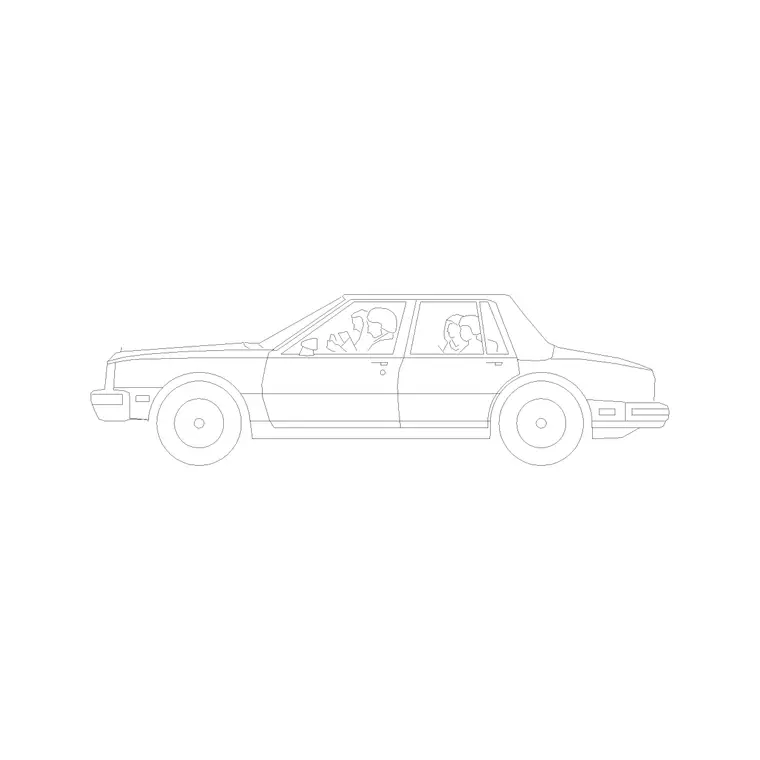
A car with family CAD block pairs a passenger car with human figures beside it, so a single drop into your elevation tells a small story — people arriving, loading, or standing by the vehicle — while still giving you accurate scale. It is the block to reach for when a presentation drawing needs life and context rather than an empty parked car. This page offers a free car-with-family block in DWG and DXF, drawn in side elevation at true scale for AutoCAD 2004 or later, free for personal and commercial use with no signup or watermark.
Use it on residential driveways, dealership and showroom boards, lifestyle visuals and any frontage where you want the car to feel occupied and active. Because the car and the figures are drawn to a shared scale, the block doubles as a reliable size check against doors, kerbs and the building behind.
What the car with family block is
This block combines a side-elevation car profile with one or more human figures positioned alongside it — typically an adult and a child or a small group near the doors. It is line geometry, so it prints cleanly and stays light, and the figures share the car's scale exactly.
The value of bundling people with the car is narrative: a parked car reads as static, while a car with figures beside it reads as a moment — a family arriving home or loading the boot. That makes the block especially useful on presentation sheets where atmosphere matters as much as accuracy.
View and what's included
The download is a side elevation showing the car and accompanying figures square-on from the kerb. It suits residential frontages, driveway studies, showroom boards and lifestyle presentation views where the building, the car and the people all sit at the same scale.
The car and the figures are layered so you can recolour or mute either independently, and you can explode the block to reposition a figure if your composition needs it. Kept whole, it copies and mirrors as one unit, which is convenient when you want a consistent grouping repeated across a scene.
Typical sizing to design around
Use the block as a scale anchor. The car itself generally falls in the usual passenger-car range — roughly 4.3–4.9 m long and about 1.4–1.5 m tall — while the adult figures stand around 1.6–1.8 m and any child figure proportionally shorter. Those relationships are what make the grouping read correctly.
Because the figures are drawn to the same scale as the car, you can use them as a quick check on the whole elevation: if a person looks wrong beside a 2 m doorway, the drawing has a units problem rather than a block problem. Scale to the envelope your scene needs, not to a single fixed dimension.
How to insert the block
The DWG is full size in millimetres. In a millimetre drawing, insert at scale 1 for real size; in a metre drawing, insert at 0.001. On an imperial template, set INSUNITS to millimetres so AutoCAD rescales on insertion, or insert at 0.03937 to convert to inches.
Snap the insertion point near the car centreline and mirror the whole group to face the other way if the composition needs it. Because car and figures travel together as one block reference, the grouping stays coherent when you copy it — and you can always explode and nudge a single figure for a better composition.
Where car with family blocks are used
This block belongs on presentation and marketing drawings: residential elevations and driveway visuals, car-showroom and dealership boards, estate-agent and developer brochures, and lifestyle render-style line drawings. Anywhere a scene needs to feel inhabited rather than empty, a car with people earns its place.
Architects and visualisers use it to warm up an elevation; sales and marketing teams use it on brochure sheets; students use it on portfolio boards because it is licence-clear. Combine it with standalone people and other vehicles from the vehicles category to populate a wider, believable street scene.
Composing a believable family scene
A grouping of car and people works best when it implies an action rather than a frozen pose. Position the figures as if they are walking towards the doors, lifting bags from the boot or pausing on the driveway, and the scene gains a sense of movement that a single static car never has. Even in line drawing, that implied narrative is what makes a presentation board feel lived-in.
Watch the overlap between the figures and the car so the people do not float in front of the wheels or merge into the bodywork. A short gap between a figure and the car edge reads as a person standing beside the vehicle; too much overlap reads as a mistake. Because the elements share a layer-aware structure, you can nudge a figure a little forward or back until the composition sits right.
Free download
Browse the full library — DWG & DXF, no signup.
Questions
Frequently asked
Is the car with family CAD block free for commercial use?+
Yes. It downloads free in DWG and, where available, DXF, with no signup, no watermark and no attribution requirement, and it is cleared for commercial work.
Can I separate the people from the car?+
Yes. Explode the block and the car and figures become independent objects you can reposition, recolour or delete. The car and figures are also on separate layers for easy control.
What scale are the car and figures drawn at?+
Both are drawn full size in millimetres at a shared scale, so the people are correctly proportioned beside the car. Insert at scale 1 in a millimetre drawing or set INSUNITS to millimetres.
Which drawings is this block best for?+
Presentation and lifestyle elevations — residential frontages, driveway visuals and showroom boards — where you want the scene to feel occupied. For technical parking layouts use a plan-view vehicle block.
Related downloads
Blocks for this guide
Related categories
Related guides
Block landing
Free Car Plan View CAD Block — DWG Download
Download a free car plan-view CAD block in DWG and DXF — the top-down footprint for parking layouts and site plans. AutoCAD 2004+, no signup.
Block landing
Free Car Elevation CAD Block — DWG Download
Download a free car elevation CAD block in DWG and DXF — side and front views for streetscapes, showrooms and presentations. AutoCAD 2004+, no signup.
Block landing
Free Sedan Car CAD Blocks — DWG Download
Download free sedan car CAD blocks in DWG and DXF — saloon and luxury sedans in plan and elevation for parking and showrooms. AutoCAD 2004+, no signup.