Block landing · 2 door car cad block dwg
Free 2 door car CAD block in DWG and DXF in 2026
By Sumana Kumar · Published 10 Jul 2025 · Updated 16 Feb 2026
A 2 door car CAD block is the short-wheelbase, two-door body you reach for when an elevation or a street scene needs a smaller, sportier silhouette than a four-door family car. This page offers a free two-door car block in DWG and DXF, drawn in side elevation at true scale so it sits correctly against a building facade, a boundary wall or a kerb line. It is free for personal and commercial work, with no signup, no watermark and no attribution required.
Because a two-door body is shorter and lower than a saloon, it is the right choice when you want a car in the frame without it dominating the drawing. Drop it into a streetscape, a showroom elevation, a driveway study or a parking detail and use it as a believable scale reference against doors, signage and people.
What the 2 door car block is
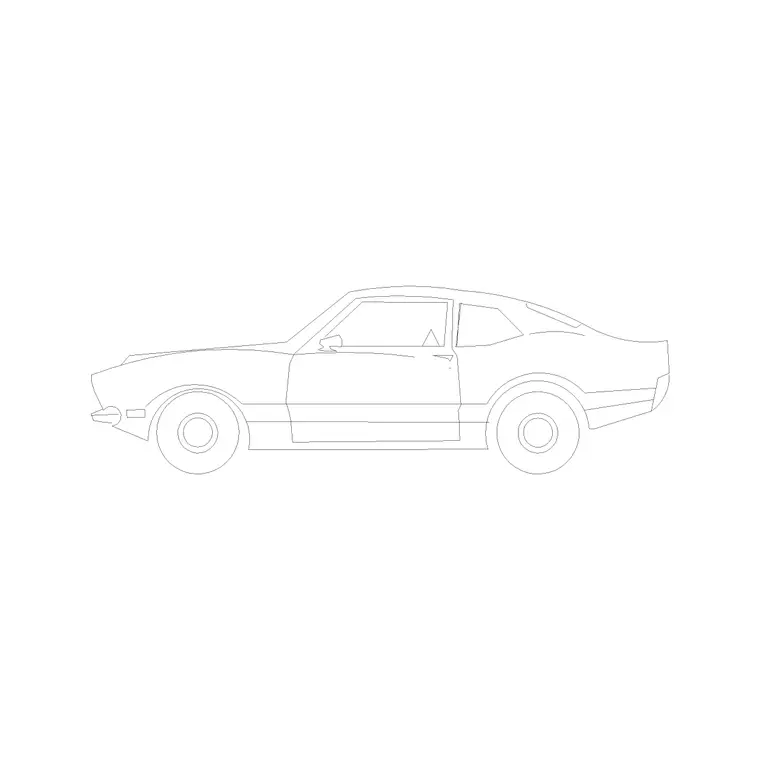
This block is a side-elevation profile of a compact two-door car — the kind of coupe or three-door hatch body with a single long door each side, a sloping roofline and a short rear deck. It is an outline drawing, not a rendered image, so it stays light in the file and prints cleanly at any scale.
The profile captures the features that make a two-door read as a two-door: the long door cut, the pillar positions, the wheel arches and the lower, faster roof curve. Those details matter when the car is meant to characterise a scene rather than just occupy space, because a viewer recognises the body type instantly from the side.
View and what's included
The download ships in side elevation — the car seen square-on from the kerb. That is the view you want for building elevations, boundary-wall studies, street sections and showroom drawings, where the vehicle sits beside walls, openings and figures drawn at the same scale.
The geometry is on sensible layers so you can recolour the body, mute the glazing or thin the wheel detail without exploding the whole block. Keep it as a single block reference and it copies, mirrors and rotates as one object, which is exactly what you want when you are placing two or three cars along a frontage.
Typical sizing to design around
Treat the block as a scale check, not a spec sheet. A small two-door car generally sits in the region of 3.6–4.3 m long, around 1.7–1.8 m wide and roughly 1.3–1.4 m tall at the roof — lower and shorter than a typical four-door saloon. The wheelbase is correspondingly short, which is what gives the body its compact, planted look in elevation.
Use those ranges to sanity-check the block against the rest of your drawing. If a 2 m doorway next to the car looks wrong, the issue is almost always a units mismatch on insertion rather than the block itself. Real models vary, so scale to the envelope your scene needs rather than chasing an exact figure.
How to insert the block
The DWG is drawn full size in millimetres. In a millimetre drawing, run INSERT (or drag the DWG in from a tool palette) and place it at scale 1 and the car lands at real size. Working in metres? Insert at 0.001. On a US imperial template, set INSUNITS to millimetres so AutoCAD rescales automatically, or insert at 0.03937 to convert to inches.
Pick an insertion point at the car's centreline, then mirror it if the scene needs the car facing the other way. Because it is a block reference, a later edit to the definition with BEDIT updates every copy in the drawing at once — handy if you decide to simplify the glazing for a small-scale plot.
Where two-door car blocks are used
A 2 door car block earns its place in streetscape elevations, residential driveway studies, showroom and dealership drawings, urban-design sections and presentation boards. It is a natural fit beside a single-car garage or a narrow driveway, where a shorter body reads more honestly than a full-length saloon.
Architects and urban designers use it to give scale to a frontage; interior and retail designers use it in showroom elevations; students reach for it on portfolio sheets because it is licence-clear. Pair it with people, trees and other vehicle blocks from the vehicles category to build a lively, correctly-scaled scene quickly.
Keeping the two-door car on the right layer
A small discipline pays off across a project: place the two-door car on a dedicated vehicle layer rather than on layer 0, so it carries its own colour and lineweight. That lets you freeze the cars and plot a clean facade for a technical issue, then thaw them again for a presentation sheet — both from the same drawing, with no duplicate geometry to maintain.
Because the body is short, it is also the easiest car to fit into a cramped composition without crowding the architecture behind it. If you want a reusable arrangement, select a car together with its shadow or kerb context and write it out with WBLOCK, so the next driveway elevation starts from a grouping you have already proven at the right scale.
Free download
Browse the full library — DWG & DXF, no signup.
Questions
Frequently asked
Is the 2 door car CAD block free for commercial use?+
Yes. It downloads free in DWG and, where available, DXF, with no signup, no watermark and no attribution requirement, and it is cleared for commercial project use.
What view does the two-door car block come in?+
Side elevation — the car seen square-on from the kerb. That suits building elevations, street sections and showroom drawings. For parking layouts you want a plan-view vehicle block instead.
What scale is the block drawn at?+
Full size in millimetres. Insert at scale 1 in a millimetre drawing, 0.001 in a metre drawing, or set INSUNITS to millimetres so AutoCAD rescales the block automatically on insertion.
Will the file open in older AutoCAD or a free viewer?+
Yes. The DWG targets AutoCAD 2004 and later, which opens in current AutoCAD, AutoCAD LT, BricsCAD, DraftSight and free DWG viewers such as Autodesk's online viewer.
Related downloads
Blocks for this guide
Related categories
Related guides
Block landing
Free Car Plan View CAD Block — DWG Download
Download a free car plan-view CAD block in DWG and DXF — the top-down footprint for parking layouts and site plans. AutoCAD 2004+, no signup.
Block landing
Free Car Elevation CAD Block — DWG Download
Download a free car elevation CAD block in DWG and DXF — side and front views for streetscapes, showrooms and presentations. AutoCAD 2004+, no signup.
Block landing
Free Sedan Car CAD Blocks — DWG Download
Download free sedan car CAD blocks in DWG and DXF — saloon and luxury sedans in plan and elevation for parking and showrooms. AutoCAD 2004+, no signup.