How-to guide · how to insert a bed block in autocad
How to insert a bed block in AutoCAD
By Sumana Kumar · Published 19 Jan 2023 · Updated 11 May 2026
The bed sets the whole bedroom out. It is the largest single block in the room, its position is almost fixed by the headboard wall, and every other piece — wardrobes, side tables, a dressing table — arranges itself around the access space the bed needs. Place the bed well and the bedroom layout falls into place; place it badly and you end up with a wardrobe you can't open or a side of the bed nobody can reach. This guide covers inserting a bed block in AutoCAD and giving it the clearances a real bedroom needs.
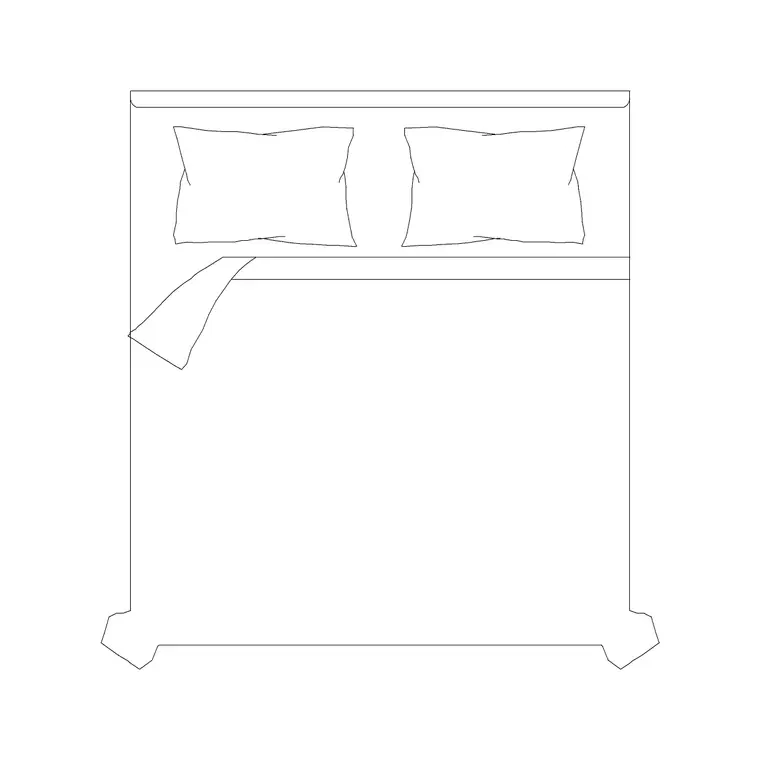
We will use a plan-view double bed as the worked example, but the same approach applies to single, king and super-king blocks — only the mattress footprint changes. The key is picking the right size first, because a bed inserted at the wrong size quietly throws out every clearance in the room.
Step 1 — Pick the right mattress size
Beds are sold by mattress size, and the block you choose must match the brief. Common footprints, mattress only, run roughly: single around 900 × 1900 mm, small double around 1200 × 1900 mm, double (standard) around 1350–1400 × 1900 mm, king around 1500–1600 × 2000 mm, and super-king around 1800 × 2000 mm. The bed frame adds a little around the mattress, and a headboard adds depth at the top.
Choose the block for the actual bed size — don't drop a king in 'to be safe' and lose the walkway. Some blocks come with integral side tables and some without, so pick the variant that suits how you'll arrange the room. Save the DWG; it is drawn full size in millimetres.
Step 2 — Set units and insert the bed
Confirm UNITS is set to Millimeters for the insertion scale so AutoCAD rescales the block correctly. Run INSERT, browse to the bed DWG, and choose it with the insertion point on 'Specify On-screen'. The natural base point is the top centre of the bed — the midpoint of the headboard — because that is the point you align with the headboard wall.
Click to drop the bed in the room. It arrives as a single block reference, so the mattress, frame, headboard and any pillows or side tables move together as one object.
Step 3 — Place the headboard against the wall and centre it
A bed almost always sits with its headboard flush to a wall, usually the wall opposite the door or the one without windows. MOVE the bed with a perpendicular or nearest snap so the headboard edge meets the wall line, and ROTATE it if that wall runs at an angle. Centre the bed on the wall where the room allows, so the bedside space is balanced on both sides.
If the bed includes a headboard graphic, make sure that edge — not the mattress edge — touches the wall, so the drawing reads correctly and the dimensions to the wall are honest.
Step 4 — Leave bedside and foot clearance
Now lay in the access space, which is what makes a bedroom usable. Allow at least 600–700 mm of clear floor down each side of the bed you need to access (so you can get in and make the bed), and ideally similar at the foot. Where a side table sits, the bed plus table still needs that walking gap beyond it. If only one side is accessed (a bed pushed into a corner for a child's room), you can drop the far side to nothing, but flag that it is a single-access bed.
Because the block is true to size, you draw or measure these gaps directly. If a side comes in under ~600 mm, shift the bed toward the other wall or step down a mattress size.
Step 5 — Layer the bed and arrange the rest of the room
Put the bed on the furniture layer so it freezes and thaws with the other furniture, and so it carries its own colour and lineweight. With the bed fixed, the room arranges around it: side tables to the bedside gap, a wardrobe on a wall where its doors clear the bed, a dressing table under a window. Check each addition against the bed's access space.
Keep the bed as a block reference for scheduling, and if you are laying out repeated bedrooms — a hotel floor, a hall of residence — WBLOCK the resolved bed-and-side-table arrangement and array it from one definition so a change updates every room at once.
Common pitfalls when inserting a bed
The biggest mistake is upsizing the mattress 'just in case' and eating the walkway — a king where a double belongs can leave a side under 500 mm, too tight to pass. Always size the bed to the brief and then verify the side clearances. The second common error is putting the mattress edge against the wall rather than the headboard, which makes the bed read as floating and throws the dimensions off by the headboard depth.
A third is forgetting that wardrobe and door swings have to clear the bed — coordinate those against the bed footprint before the layout is signed off. And as always, if the bed lands wildly oversized, the cause is units, not the block: fix INSUNITS rather than scaling.
Free download
Browse the full library — DWG & DXF, no signup.
Questions
Frequently asked
What is the footprint of a double bed CAD block?+
A standard double bed mattress is roughly 1350–1400 mm wide by 1900 mm long, with the frame and headboard adding a little around it. A king runs about 1500–1600 × 2000 mm and a super-king about 1800 × 2000 mm. Pick the block that matches the bed size in your brief.
How much space should I leave around a bed?+
Allow at least 600–700 mm of clear floor down each accessed side of the bed, and similar at the foot. A side under about 600 mm is too tight to walk and make the bed, so shift the bed or step down a mattress size.
Which way should the bed face in the plan?+
Place the headboard flush against a wall — usually the wall opposite the door or one without windows — and centre the bed on that wall so the bedside space is balanced. Make sure the headboard edge, not the mattress, touches the wall.
Should I pick a bed block with or without side tables?+
Use a bed-with-side-tables block when the bedside layout is fixed and you want it as one object. Use a bare bed block when you need to position side tables, a bench or other furniture independently around the bed.
Related downloads
Blocks for this guide
Popular blocks to download
Related categories
Related guides
How-to guide
How to Insert a Wardrobe Block in AutoCAD
Insert a wardrobe block in AutoCAD: match units, place it flush to the wall, check the door swing or sliding clearance, and stretch it to the run length.
How-to guide
How to Insert a Dressing Table Block in AutoCAD
Insert a dressing table block in AutoCAD: place the vanity on the wall, leave stool pull-out space, align with the light, and draw the mirror in elevation.
Curated pack
Free Bedroom CAD Block Pack — DWG & DXF
Free bedroom CAD block pack in DWG and DXF — double beds, side tables, wardrobes and seating in plan and side view for AutoCAD. No signup, commercial OK.