Block landing · low height bed cad block
Free low-height bed CAD blocks for AutoCAD
By Saumyajit Maity · Published 28 Mar 2024 · Updated 13 Jun 2026
A low-height bed sits closer to the floor than a standard divan, and that lower profile is a deliberate design choice — it makes a ceiling feel taller, suits a minimalist or platform-bed aesthetic, and is easier and safer for some users to get in and out of. This page offers free low-height bed CAD blocks in DWG and DXF, drawn at true millimetre dimensions and ready to insert into AutoCAD 2004 or later. Because the defining feature of a low bed is its height, these blocks are most useful in side elevation and section, where that reduced height actually shows.
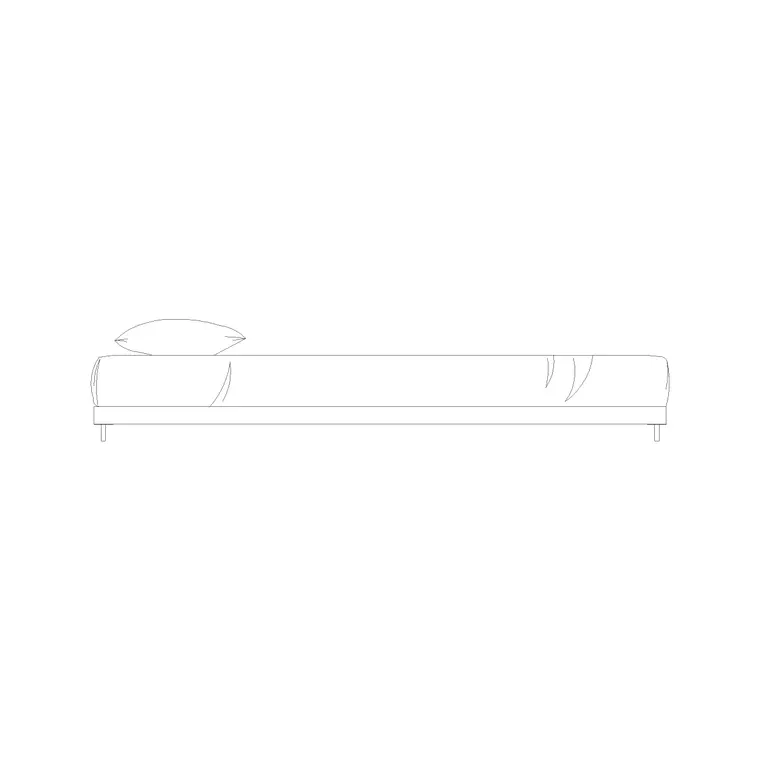
Low-height beds — platform beds, futon-style and Japanese-influenced floor beds — are specified where a clean, grounded look or a low transfer height matters. The catalogue here includes a dedicated low-height bed side elevation so you can show the profile correctly on an interior elevation. Every file is free for personal and commercial work, with no signup, no watermark and no attribution required.
What makes a bed 'low-height'
A low-height bed is defined by the height of the mattress top above the floor, not by its plan footprint. Where a standard divan or sprung bed puts the mattress top around 550–650 mm off the floor, a low-height or platform bed brings it down to roughly 300–450 mm, and a true floor bed can sit lower still. The plan footprint is the same as any double or queen of the equivalent size — it is the elevation and section that tell the low-height story.
That is why the key block for a low bed is a side elevation. It shows the slim base, the mattress thickness and the low overall height, often with a minimal or no headboard, which is exactly the information an interior elevation or a section through the room needs to carry.
Typical low-height bed dimensions
Plan around the same mattress sizes as a standard bed, then design the height to the low-profile figures. Mattress top height above floor for a low bed is commonly 300–450 mm, against 550–650 mm for a conventional divan. The base or platform itself is shallow — often only 150–300 mm of frame below the mattress — which is what produces the grounded look. The dedicated low-height side elevation on this site is drawn to that reduced-height convention.
The lower height changes a couple of practical clearances. A low bed gives more apparent ceiling height, which is useful in a loft or a room with a sloping ceiling where a tall divan would feel cramped. It also lowers the transfer height for getting in and out, which matters for some users. The scaled elevation lets you check the bed against a window sill or a sloping rafter line directly.
Why the elevation is the important view
For most furniture you plan in plan view, but for a low-height bed the side elevation does the real work. The whole point of specifying a low bed is the height, and the height only reads in elevation or section. An interior elevation of a bedroom wall shows the low bed sitting beneath a window, against a feature wall, or under a sloping ceiling, and that is where a client or contractor sees the design intent.
Use the plan footprint for the layout, exactly as you would any bed, then bring in the side-elevation block for the interior elevations and the section. Drawing the bed at its true low height in elevation also lets you coordinate the headboard or feature wall, the window sill height and any wall-mounted lighting so they sit correctly relative to the lower mattress line.
How to insert the low-bed elevation
The blocks are drawn full size in millimetres. Insert at scale 1 in a millimetre drawing, 0.001 in a metre drawing, or set INSUNITS to millimetres so AutoCAD rescales them automatically. For an interior elevation, run INSERT and place the side-elevation block on the floor line of your elevation, snapping the base of the bed to the finished floor level so the low height reads correctly against the wall and window.
Keep the elevation block on the same layer convention as the rest of your interior elevation furniture so it prints with consistent lineweight. If you are also producing the plan, use a standard bed plan block of the matching size for the layout and reserve the low-height elevation for the elevation and section sheets, where its profile is the whole reason it exists.
Where low-height beds are used
Low-height and platform beds appear in contemporary residential interiors, loft conversions and attic bedrooms with sloping ceilings, minimalist and Japanese-influenced design schemes, boutique hotels and accessible or low-transfer rooms. Interior designers specify them for the grounded, calm aesthetic and use the side elevation to present it. Architects use them in rooms with restricted ceiling height, where a low bed buys back the head clearance a tall divan would lose.
Pair the low-height bed with the bedside-table and wardrobe blocks in the bedroom category, choosing low bedside cabinets that match the bed's reduced height, and use the elevation block across the interior elevation set so the low profile is consistent room to room.
Coordinating a low bed with the room
The reduced height of a low bed ripples out to the things around it, and drawing it correctly in elevation is how you catch that. A bedside table that suits a standard divan will often look too tall beside a low bed, so the elevation lets you check the cabinet height against the lower mattress line and pick a matching low bedside block. Wall lights, art and a headboard or feature panel all want setting out relative to the lower mattress top rather than a standard one, and only the true-height elevation shows whether they sit comfortably.
In a loft or attic bedroom the low bed often does its best work under the slope of the ceiling, where the headroom over a standard bed would be tight. Drawing the low-height side elevation against the actual rafter or ceiling line in section confirms the sleeper has clear headroom sitting up in bed — a check that the plan footprint alone can never give you, and the main reason the elevation block matters for this particular bed type.
Free download
Browse the full library — DWG & DXF, no signup.
Questions
Frequently asked
How low is a low-height bed compared with a normal bed?+
A low-height or platform bed puts the mattress top roughly 300–450 mm above the floor, against about 550–650 mm for a standard divan. The plan footprint matches a normal bed of the same size — the difference shows only in elevation and section.
Why is the side elevation the key view for a low bed?+
Because the defining feature of a low bed is its height, which reads only in elevation or section. The side-elevation block shows the slim base, mattress thickness and low overall height, which is exactly what an interior elevation or a section through the room needs.
Are low-height beds good for rooms with sloping ceilings?+
Yes. A low bed gives more apparent headroom, so it suits lofts and attic bedrooms where a tall divan would feel cramped under the slope. Draw the low elevation against the rafter line in section to confirm clear headroom for sitting up in bed.
Are the low-height bed blocks free for commercial use?+
Yes. They download free in DWG and, where available, DXF with no signup, no watermark and no attribution requirement, and they are cleared for commercial project use.
Related downloads
Blocks for this guide
Popular blocks to download
Related categories
Related guides
Block landing
Free Double Bed CAD Blocks — DWG Download
Download free double bed CAD blocks in DWG and DXF — plan and elevation views at true millimetre size for AutoCAD bedroom layouts. No signup, commercial-use OK.
Block landing
Free King-Size Bed CAD Blocks — DWG Download
Download free king-size bed CAD blocks in DWG and DXF — large master-bed plan drawn to true size for AutoCAD master suites. No signup, commercial OK.
Block landing
Free Queen-Size Bed CAD Blocks — DWG Download
Download free queen-size bed CAD blocks in DWG and DXF — the mid-size main-bedroom bed drawn to true scale for AutoCAD layouts. No signup, commercial-use OK.