Block landing · bed with side tables cad block
Free bed with side tables CAD blocks for AutoCAD
By Sumana Kumar · Published 22 Apr 2026 · Updated 17 May 2026
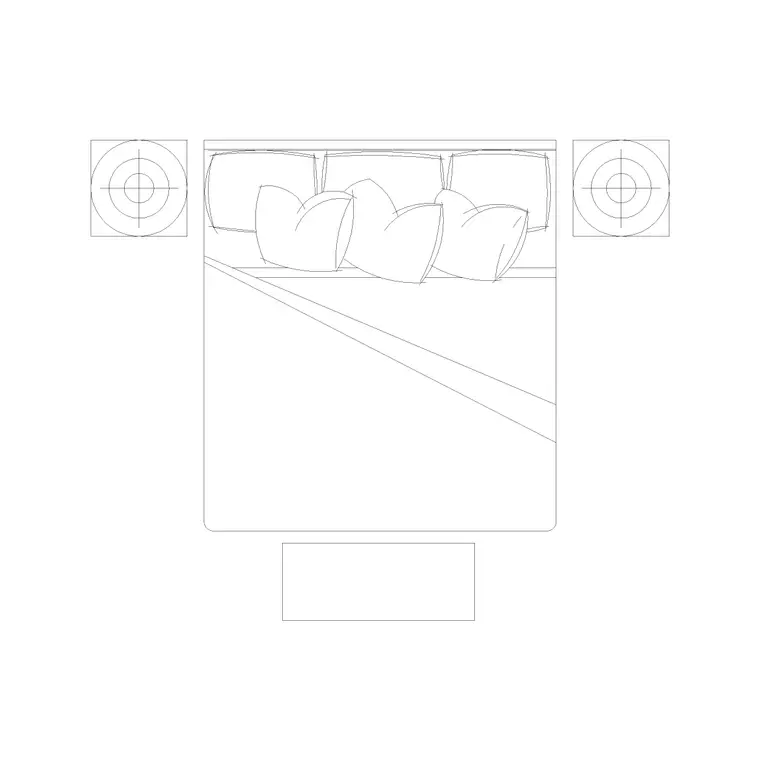
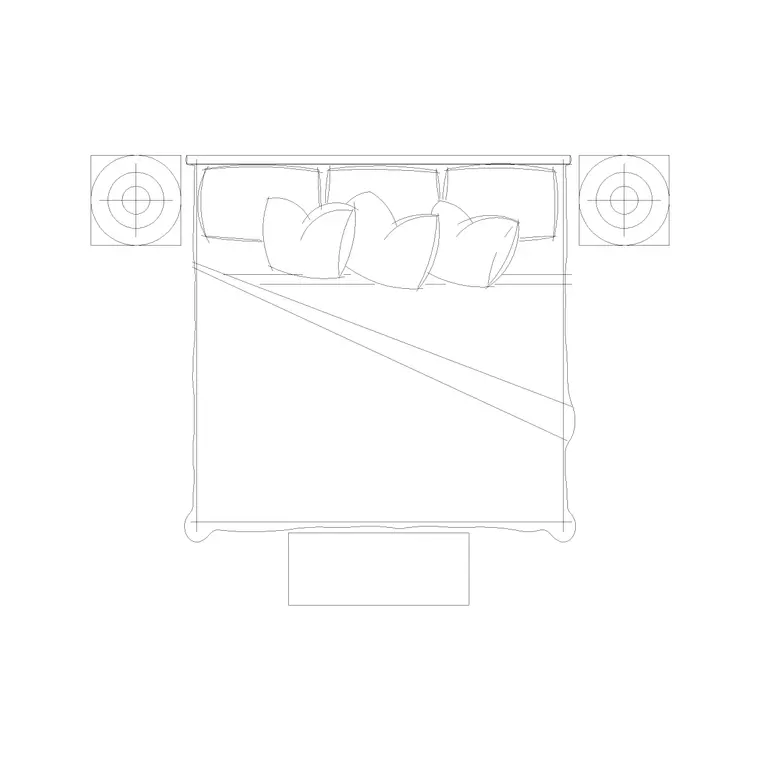
A bed flanked by a matching pair of side tables is the most common bedroom composition there is, so having the whole arrangement as one ready-made block saves placing three objects every time. This page offers free bed-with-side-tables CAD blocks in DWG and DXF, drawn at true millimetre dimensions and ready to insert into AutoCAD 2004 or later. The set shows the bed, headboard and a bedside table to each side in plan, so the full composed footprint reads at a glance.
The advantage of a combined block is that it captures the real planning unit. In practice you rarely place a bed without bedside tables, and the gap each table needs beyond the mattress is exactly what decides whether the bed fits a wall. Drawing them together means you are testing the true envelope from the first insertion. Every file is free for personal and commercial work, with no signup, no watermark and no attribution required.
What's in the bed-with-side-tables block
The block is a composed set: a bed with its headboard, plus a bedside table to the left and right drawn at matching size. The featured catalogue item is an 1820 × 2030 mm double bed with a side-table set, so the dimension you plan around already includes the tables, not just the mattress. That is the practical difference from a bare bed block — the side tables add width beyond the bed, and this set already accounts for it.
The geometry sits on sensible layers so you can separate the bed, the headboard and the side tables. Drop just one table for a bed pushed into a corner, recolour the tables independently, or strip back to the bed alone — the set flexes without you redrawing the arrangement.
Typical sizing for the bed-and-table set
Plan around the whole composed footprint. The bed itself is a double at roughly 1820 mm wide by 2030 mm deep including the headboard. A bedside table is typically 400–500 mm square to about 450 × 600 mm, and it usually sits flush with or just proud of the headboard line. With a table to each side, the overall composition often spans around 2700–2900 mm across the wall, which is the figure that decides whether the set fits between a window and a corner.
For circulation, the side a person gets out of the bed still needs 700 mm of clear floor beyond the table, and the headboard wall must be long enough to take the bed plus both tables. The scaled set makes both checks immediate, and it stops the classic mistake of fitting the bed but forgetting the tables need extra wall length.
Why place the bed and tables as one block
Combining the bed and its side tables into a single block reference has real workflow value. You place, rotate and mirror the whole sleeping arrangement in one operation, so flipping a bedroom's handing — a frequent need when two units mirror each other across a party wall — is a single MIRROR command rather than three separate moves that have to stay aligned.
It also keeps the composition consistent across a project. Every bedroom that uses the set gets identical table spacing and alignment, which reads cleanly on a furnished plan and matches room to room. When you do need to break the pattern — a corner bed with only one table — you explode the set or simply delete the table you do not need.
How to insert and mirror the set
The block is drawn full size in millimetres. Insert at scale 1 in a millimetre drawing, 0.001 in a metre drawing, or set INSUNITS to millimetres so AutoCAD rescales it on insertion. Run INSERT or drag the DWG in, pick an insertion point at the centre of the headboard so the set pivots cleanly, and rotate the whole arrangement against the chosen wall.
To flip the bedroom handing, use MIRROR with a mirror line down the room centre — the bed, headboard and both tables flip together and stay aligned. Keep the set on a dedicated furniture layer so the bedroom furnishings toggle on and off as a unit, and only explode the block if you genuinely need to edit a single table in place.
Where the bed-and-tables set is used
The combined set suits any project where bedrooms repeat and consistency matters: hotels, serviced apartments, student and senior living, residential developments and show homes. Hospitality designers value it because every guest room gets the same bed-and-table arrangement from one block, which the FF&E schedule then counts as a single line. Architects use it to populate residential plans fast, knowing the tables are already accounted for in the footprint.
Pair the set with the wardrobe, dressing-table and bench blocks in the bedroom category to complete a furnished room, and use the same block to drive both the architectural plan and the furniture count for procurement.
Adapting the set to different rooms
Most bedrooms can take the full symmetrical set, but real rooms throw up exceptions, and the block handles them. Where a bed sits in a corner or against a window reveal, delete one table and let the bed push to the wall on that side. Where a room is generous, slide the tables a little further from the headboard for a more relaxed composition, or swap them for the larger bedside-table blocks in the catalogue.
For a development with several bedroom types, set up the bed-and-table set as your standard main-bedroom unit, then build the secondary bedrooms from a single bed plus one table. Tagging each set with a room-type attribute lets you schedule the bedrooms by type, and WBLOCK-ing the finished arrangement makes it a reusable unit you can array down a corridor of identical rooms in seconds.
Free download
Browse the full library — DWG & DXF, no signup.
Questions
Frequently asked
What does the bed-with-side-tables block include?+
A bed with its headboard plus a matching bedside table to each side, drawn as one composed set in plan. The featured item is an 1820 × 2030 mm double bed with a side-table set, so the footprint already accounts for the tables.
How wide is the bed-and-tables composition on the wall?+
With a table to each side, the set commonly spans around 2700–2900 mm across the wall, depending on table size. That full span — not just the mattress width — is the figure that decides whether the arrangement fits between a window and a corner.
Can I place only one side table?+
Yes. The block is on sensible layers, so you can explode it or simply delete the table you do not need — handy for a bed pushed into a corner or against a window reveal where only one side table fits.
Are the bed-with-side-tables blocks free for commercial use?+
Yes. They download free in DWG and, where available, DXF with no signup, no watermark and no attribution requirement, and they are cleared for commercial project use.
Related downloads
Blocks for this guide
Popular blocks to download
Related categories
Related guides
Block landing
Free Double Bed CAD Blocks — DWG Download
Download free double bed CAD blocks in DWG and DXF — plan and elevation views at true millimetre size for AutoCAD bedroom layouts. No signup, commercial-use OK.
Block landing
Free King-Size Bed CAD Blocks — DWG Download
Download free king-size bed CAD blocks in DWG and DXF — large master-bed plan drawn to true size for AutoCAD master suites. No signup, commercial OK.
Block landing
Free Queen-Size Bed CAD Blocks — DWG Download
Download free queen-size bed CAD blocks in DWG and DXF — the mid-size main-bedroom bed drawn to true scale for AutoCAD layouts. No signup, commercial-use OK.