How-to guide · how to insert a garage door block in autocad
How to insert a garage door block in AutoCAD
By Saumyajit Maity · Published 1 Dec 2022 · Updated 19 Feb 2026
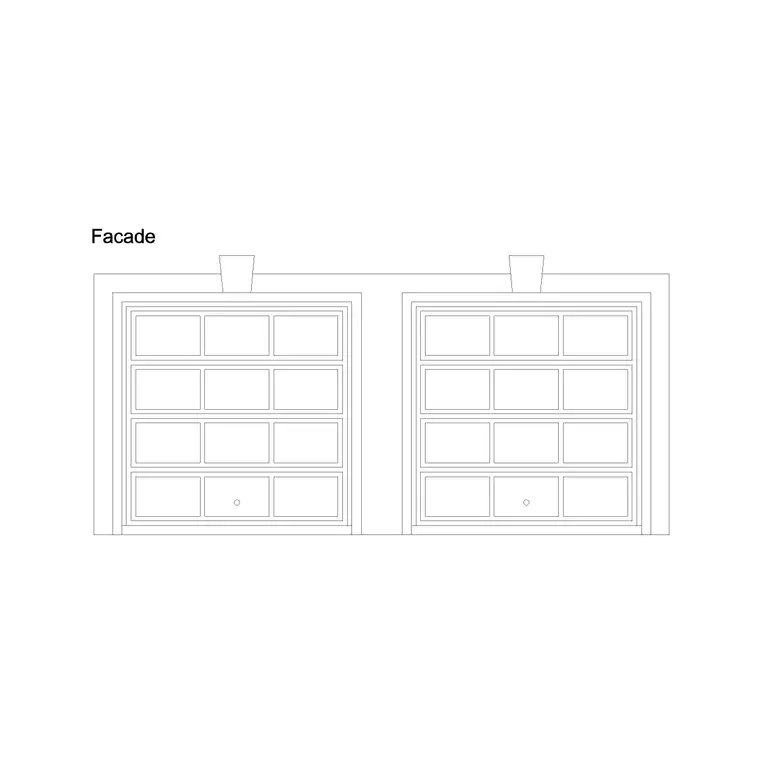
A garage door is mostly an elevation block. Unlike an internal door, what matters to a viewer is the face of the door — the panel pattern, the proportions, the way it sits in the opening — far more than a swing in plan. So inserting a garage door usually means dropping a front-elevation block into a building elevation, with a lighter plan-view symbol used only to mark the opening on the floor plan. This guide covers both placements and the operation types that change how you draw them.
Garage doors come in distinct mechanisms — sectional (panels that fold up and back), roller (a curtain that coils into a drum), up-and-over (a single tilting slab), and side-hinged (a pair of swing leaves). Each one reads differently in section and affects the ceiling and headroom you need to show, so the block you pick should match the door you're specifying, not just the hole in the wall.
Decide whether you need elevation or plan
First, work out which drawing you're populating. For a building elevation — the most common case — you want a front-elevation garage door block showing the panel pattern, any window lites, and the proportions of the opening. For the floor plan, you need only a simple plan symbol: two lines marking the opening in the wall, sometimes with a thin indication of the door leaf and its operation.
The doors category includes garage door elevation blocks with panelled faces. Pick the panel style — square-panel, ribbed, glazed — that matches the design, since this is the visible, character-defining element of the elevation.
Set the opening to a real garage door size
Garage doors come in standard widths driven by car count. A single-car door is typically 2400 to 2700 mm wide; a double-car door spans roughly 4800 to 5000 mm. Heights are commonly 2000 to 2300 mm for domestic doors, taller for vans and commercial bays. Set your opening to one of these before inserting so the elevation block lands close to scale 1.
Draw the opening in the elevation as a clean rectangle bounded by the lintel above and the floor line below, then insert the door block to fill it. On the floor plan, OFFSET the jambs to the same width and TRIM the wall so the plan opening and the elevation opening agree.
Insert and align the elevation block
Check UNITS reads Millimeters, then run INSERT and browse to the garage door DWG. Garage elevation blocks are usually drawn with the base point at a bottom corner of the opening — bottom-left is common — so it snaps to the floor-and-jamb corner of your elevation opening.
Place it with the floor line and let the door fill up to the lintel. If the block is drawn slightly off your exact size, prefer a block at the right width over stretching a fixed elevation, because stretching distorts the panel proportions. Where the design allows, a dynamic garage door block can flex its width while keeping the panel divisions correct.
Show the operation and headroom in section
The door mechanism matters in section because it governs the space behind and above the opening. A sectional door folds up and runs back along the ceiling on tracks, so it needs headroom above the lintel and clear ceiling depth — show the tracks dashed if the section calls for it. A roller door coils into a drum above the opening, needing a headbox but little ceiling run-back. An up-and-over door tilts out then in, so it swings beyond the wall face as it opens — important for a driveway clearance check. Side-hinged doors swing like a pair of normal doors and need arc space in front.
When you draw a garage section, pick the block and the operation together so the headroom, the ceiling tracks and any external swing all read correctly for that door type.
Layer, schedule and reuse
Put the garage door on the doors layer so it isolates from the wall and cladding, and keep the panel detail on a layer you can simplify for smaller-scale plots. If the elevation set uses door references, tag the garage door so it appears in the schedule alongside the pedestrian doors.
For a terrace of identical garages or a row of commercial bays, keep the door as a single block reference and ARRAY it along the elevation — a far cleaner approach than copying the panelled face line by line. One edit to the block definition then propagates the new panel style to every bay at once.
Mistakes to watch for
The classic error is using a plan-view door symbol where an elevation is wanted, leaving a flat, characterless opening on a drawing that should show the panelled door face. Match the block view to the drawing. A second mistake is ignoring the operation: drawing a sectional door but forgetting the ceiling run-back, or an up-and-over door without checking it clears the driveway and any vehicle parked close to the door.
Finally, watch the sizing. Squashing a double-car elevation block into a single-car opening by stretching wrecks the panel proportions and makes the elevation look wrong even to a non-technical client. Download the right width, or use a width-adjustable dynamic block, so the panels stay square and evenly divided.
Free download
Browse the full library — DWG & DXF, no signup.
Questions
Frequently asked
Is a garage door block plan or elevation?+
Mostly elevation — the panelled door face is what matters on a building elevation. The floor plan needs only a simple plan symbol marking the opening in the wall. Insert the detailed elevation block into the elevation and a light opening symbol into the plan.
What are standard garage door sizes?+
A single-car door is typically 2400 to 2700 mm wide; a double-car door spans about 4800 to 5000 mm. Domestic heights run 2000 to 2300 mm, taller for vans and commercial bays. Set your opening to one of these before inserting the block.
Why does the door type matter in section?+
The mechanism governs the space it needs. Sectional doors run back along the ceiling and need headroom and ceiling depth; roller doors coil into a headbox; up-and-over doors swing out beyond the wall face; side-hinged doors need arc space in front. Match the block to the operation.
How do I keep the panel proportions when resizing?+
Don't stretch a fixed elevation block — that distorts the panels. Download a block at the right width, or use a dynamic garage door block that flexes its width while keeping the panel divisions square and evenly spaced as it grows or shrinks.
Related downloads
Blocks for this guide

Popular blocks to download
Related categories
Related guides
How-to guide
How to Create a Block in AutoCAD (BLOCK & WBLOCK)
Learn how to create a block in AutoCAD with the BLOCK and WBLOCK commands — pick a base point, choose objects, set units, and save a reusable DWG block library.
How-to guide
How to Convert DWG to DXF in AutoCAD
Convert a DWG to DXF in AutoCAD with SAVEAS — choose the right DXF version, set precision, and export clean geometry for laser cutters, CNC and other CAD apps.
How-to guide
How to Convert DXF to DWG (3 Ways)
Convert a DXF to DWG three ways — in AutoCAD with SAVEAS, free with the ODA File Converter, or in DraftSight. Pick the right DWG version and keep layers intact.